

Zoom flatly refused a free account login from mainland China - the fix was a jump host, not a proxy

A colleague based in mainland China needed to reset a Zoom account password. Opening the “Forgot your password?” page and entering the registered email didn’t produce a verification code - it produced a blunt red line: “Sorry! Free user cannot login from China.” This wasn’t a connectivity failure or a firewall block - the page itself loaded fine. Zoom’s own backend detected the combination of “free-tier account + mainland China source IP” and rejected the login at the business-logic layer.
This isn’t a “network problem” - a VPN won’t fix it
The instinctive first move is usually “must be blocked, try a different proxy” - but the error message here already spells out the actual cause: the restriction targets the account type (free tier), triggered by the login’s source region (mainland China). This is a geo-compliance rule inside Zoom’s own business logic, not a network reachability issue. Switching the egress IP with an ordinary proxy or VPN could theoretically get around this rule, but relying on a proxy/VPN in a mainland China context brings its own compliance and stability baggage - not something to build a dependency on long-term.
The page loads perfectly fine - the problem is who’s asking
The workaround that actually holds up: separate “where the person is” from “where the network egress is”
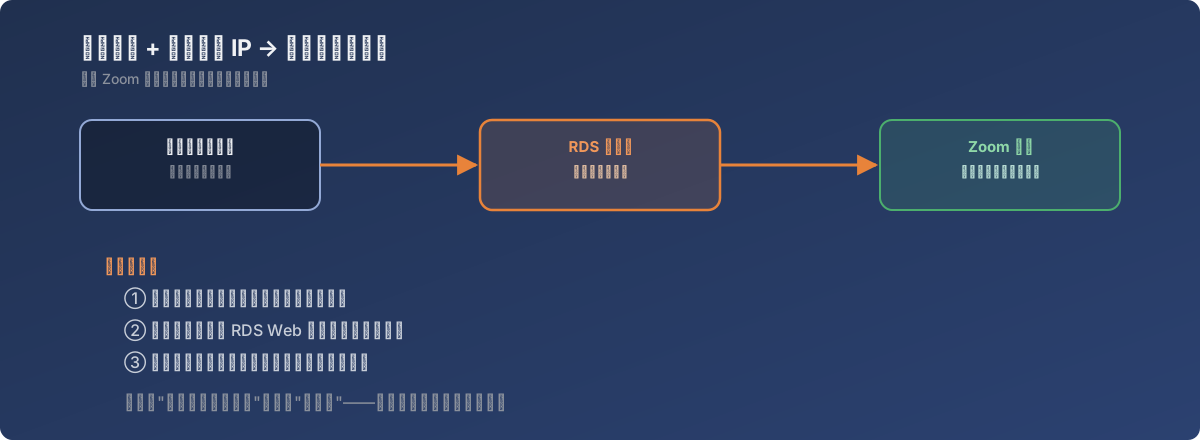
Rather than fighting with proxies, the more durable approach is to change which region the network egress is actually in, instead of disguising it - specifically, by routing the entire meeting flow through the company’s existing RDS (Remote Desktop Services) jump host:
- On receiving the Zoom meeting invite, right-click and copy the meeting link rather than clicking it directly;
- Log into the company’s RDS web portal (hosted outside mainland China) via a browser, then launch the corresponding RemoteApp;
- Inside the resulting remote session, open a browser and paste the copied meeting link;
- The meeting client launches inside that remote session - since the session’s own network egress is already outside mainland China, Zoom’s backend sees a non-mainland-China source region, and the meeting proceeds normally.
The key insight: the participant’s physical location never changes - what changes is where the network session actually happens. An RDS session’s compute and network egress live on the remote server; the local device is just a window for display and input.
Lessons
- The specific nature of a restriction matters more than the error itself. “Login failed” could mean a network-layer block, DNS poisoning, or a business-layer geo-compliance rejection - the troubleshooting direction differs completely between them. Here, the error message spelled out the exact condition (account type + region); when a message is that explicit, trust it before defaulting to “must be a firewall block”;
- When facing a business-rule-level regional restriction, “change the egress IP” is the right instinct, but how matters - an existing, stable, company-controlled RDS/jump-host path is a better long-term choice than a third-party proxy, especially in regions with stricter compliance requirements;
- This class of fix is essentially “relocate the network session, not the person” - as long as the business system only cares about where the network request originates, moving the entire session (not just a single packet) to the target region satisfies that condition cleanly, with nothing to disguise or circumvent.