

Antivirus quarantined a production system's files: no reinstall needed, use the official decrypt tool

A SAP server suddenly started throwing errors, refusing to open. The gut reaction is usually “the database is corrupted” or “a file got damaged” — but the actual truth here was simpler and easy to overlook: antivirus had quarantined it as a virus.
Investigation: the timestamp is the biggest clue
Opening the antivirus logs, the error’s timestamp lined up precisely with a scan/detection event — not a coincidence, a cause and effect. The antivirus had flagged some component of a production program as suspicious and quarantined it per policy (quarantine typically means the file gets moved or encrypted, so the program can no longer read it and errors out).
This class of false positive is not rare in enterprise antivirus, especially for:
- ERP/finance software components that behave like script injection to a heuristic engine (dynamic DLL loading, custom encryption logic) — easy targets for heuristic false positives;
- The first full scan right after a virus-definition or antivirus-version update typically has a higher false-positive rate.
The fix: the official “restore quarantined files” tool
Do not restore from a full backup to solve this — nothing is corrupted; the file is intact, just “locked.” Enterprise antivirus suites (Trend Micro Worry-Free Business Security in this case) ship a dedicated self-service tool for exactly this:
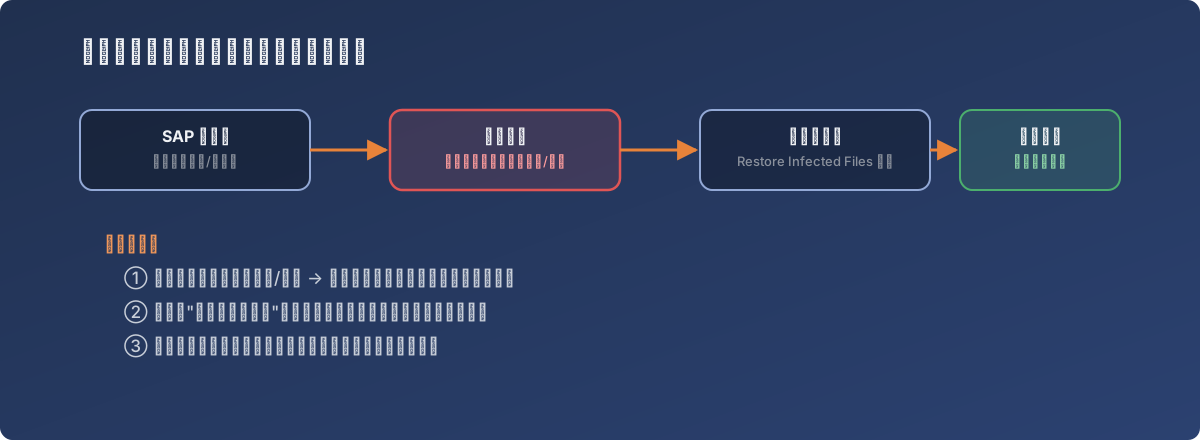
A problem the vendor caused, solved with the tool the vendor provides — not the heaviest hammer available
- Log into the antivirus management console and find Administration → Tools → Restore Infected Files (the exact menu label varies by vendor, but the function is always “decrypt quarantined files”);
- Download the corresponding restore tool, run it on the affected server, and point it at the quarantined file;
- Once decrypted, the program works again immediately — no service restart, no restore-from-backup, no data loss;
- Add that program’s install directory to the antivirus’s scan exclusion list to prevent the same misfire on the next scan.
Lessons
- When a business system suddenly errors, check the antivirus logs first. Lining up “when the program broke” with “when the last scan ran” takes one minute and can save an entire misguided investigation;
- A false-positive quarantine doesn’t need the heaviest fix available — nothing is actually damaged, so the vendor’s decrypt tool resolves it faster and more safely than a full-machine restore;
- Add the exclusion immediately after fixing it — this isn’t optional; the same false positive will almost certainly recur on the next full scan;
- Pre-building exclusion lists for all critical business software, before it ever becomes a problem, beats adding them reactively every time.