

'Who can see this folder?' Not something anyone's memory can be trusted to answer

Folder permissions on a file server tend to accumulate the same way, one small addition at a time: a permission granted for a new hire, a permission never revoked after a project ended, another layer of inheritance stacked on during a department reorg… years in, nobody can say from memory who can actually access a given folder right now. This isn’t anyone’s individual oversight — it’s the natural shape permission management takes. Relying on memory guarantees eventual failure.
The fix: regular bulk permission exports
Using a dedicated permission-export tool, run a bulk scan of the file server’s key directories and produce a structured report — folder × user/group × permission level — in a filterable format like Excel. This isn’t a one-off task; it should be a recurring routine.
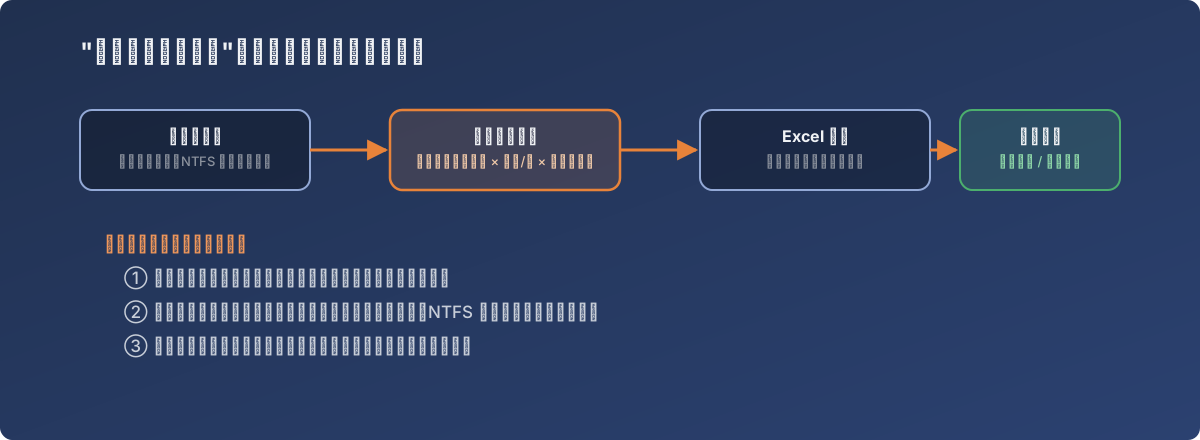
From “I think it was…” to “the report says…”
Three questions a permission report can answer
-
Who has access to this sensitive folder? — the first question asked during an offboarding audit or a security incident investigation. With a report in hand, the answer takes minutes; without one, it’s hours of digging through AD group configurations;
-
Where does the inheritance chain break, and where does it get re-opened? — the classic NTFS permission landmine: a parent folder locked down tight, while some subfolder manually breaks inheritance and grants its own access. Only a full bulk export can systematically surface these deviations from the default inheritance pattern — manually clicking through every folder to check simply doesn’t scale;
-
Compared against the last export, whose access changed quietly? — the most practical use for change auditing: archive each export, diff two snapshots, and any undocumented permission change (deliberate or accidental) becomes visible.
What needs to go along with it
- Archive every export — don’t glance at it once and discard it; the historical record is where the diff value lives;
- For especially sensitive directories (HR, finance, legal), export more frequently than for ordinary business folders;
- When an inheritance anomaly turns up, first figure out whether it was deliberate (a subdirectory genuinely needed extra access for a specific role) before deciding whether to revoke it — the bulk export surfaces “anomalies,” not automatically “mistakes.”
Lessons
- Permission management can’t run on the assumption that “probably nobody’s touched it.” Without a report in hand, that’s a guess, not a fact;
- The value of bulk exports isn’t replacing human judgment — it’s turning an enormous manual-checking task into filterable data, so human judgment gets spent on the questions that actually need it (was this exception deliberate?) instead of mechanically clicking through every folder;
- This methodology isn’t limited to file servers — any system where permissions stack up and decay over time (database roles, SaaS team permissions) benefits from the same loop: export regularly, diff, audit.