

Unexpected server reboots: the amber LED was a clue, not the answer

A Lenovo ThinkSystem server running SAP started rebooting without warning. The first time, the chassis front panel’s System Error LED went amber — per Lenovo’s troubleshooting docs, an amber light covers a long list of possible causes: temperature over threshold, voltage anomaly, a fan running slow, a fan removed, a power supply fault, or a power supply not connected.
Round one: found and “fixed” a real problem
Following the docs, the power supplies were checked first — and indeed, power supply 2 had no AC/DC indicator light. The power connection itself was faulty. Reseating the power cable firmly restored the light, and the amber LED went out too. It looked like textbook troubleshooting: doc points the way → verified on site → hardware fault found → fixed.
Round two: it came back, this time with no amber light
A few days later the server rebooted again without warning. This time, the System LED reported nothing.
This detail is the article’s real turning point: if the power issue had been the sole root cause, it shouldn’t have recurred with no error reported. The LED going out only confirms round one genuinely fixed the specific problem it flagged — it doesn’t confirm that problem was ever the real cause of “unexpected reboot.” It may have been a real, unrelated fault that simply happened to coexist.
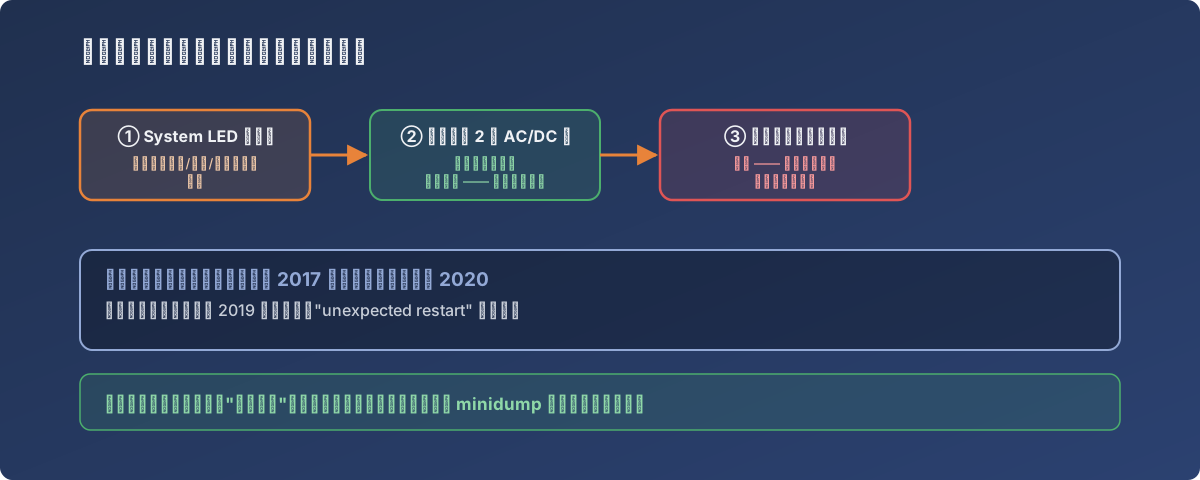
A textbook red herring: real, correctly fixed, and unrelated to the main fault
The real clue: minidumps, not the LED
With the hardware LED offering nothing further, attention turned to evidence the system leaves behind itself — C:\Windows\Minidump held several crash dump files, dated between March 24 and March 31, spaced days apart, too regular to read as random hardware flakiness.
Combined with community discussion (Lenovo servers “unexpected restart, without cleanly shutting down first” turns out to be a recognized class of issue) and a self-review, suspicion turned to the network adapter driver — stuck at a 2017 version while the system was running in 2020, three years of driver updates unapplied.
After updating the network adapter driver to a 2019 build, the “unexpected restart” never recurred.
Lessons
- A hardware indicator light reports the anomalies it knows about — not every anomaly that exists. The LED going dark only means that class of sensor reading is normal again, not that the root cause is gone;
- A recurrence with a different symptom (no LED this time) is the most valuable signal you’ll get — it’s telling you round one likely didn’t fix the real disease;
- Multiple, regularly-spaced minidumps are closer to “evidence” than a one-off indicator alarm — the dump files a crash leaves behind are what can actually be analyzed;
- Stale drivers are a badly underrated fault source — the “if it works, don’t touch it” mindset leaves driver versions frozen on install day while the system keeps running for years.