

Outlook's endless password prompt: the kind that survives clearing Credential Manager

A user’s Outlook (Microsoft 365 build of the client + on-prem Exchange) began prompting for credentials endlessly. The most maddening part was how illogical it behaved:
- Cancel the prompt — Outlook stays connected, mail flows normally;
- Re-enter the correct password — also fine, but it prompts again later;
- Clear every cached credential in Credential Manager — no change whatsoever.
The complete folk-remedy tour (all tried)
This is an ancient, famous ailment, and the internet’s checklist is well-worn:
- Check whether “Always prompt for logon credentials” got ticked in account settings;
- Clear Credential Manager (done; useless);
- Verify Outlook Anywhere authentication is NTLM;
- Build a fresh Outlook profile (done; prompts persist);
- Corrupt OST, antivirus add-ins, shared calendars, flaky network…
Full circuit completed. Problem unmoved.
The clue that actually mattered
Watching the behavior closely: the credential prompt showed Outlook attempting a cloud-format UPN identity (user@<cloud domain>), while our on-prem Exchange authenticates the domain format (DOMAIN\user).
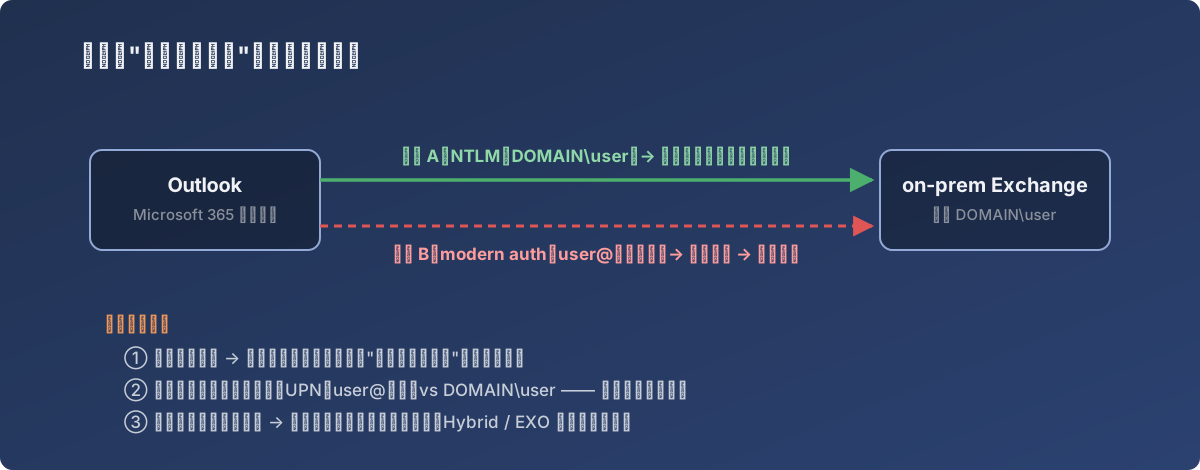
The full explanation of “cancel still works”: mail flows on one road, the prompt comes from a different one
Suddenly it all made sense. The machine ran the Microsoft 365 build of Office, which naturally leans toward modern auth with a cloud identity — while the mailbox still lived on local Exchange. Two identity systems that don’t line up. Outlook periodically tries the cloud handshake → fails → asks a human; meanwhile the underlying NTLM channel was healthy all along, which is why Cancel changed nothing.
It also explains why every client-side remedy failed — the problem wasn’t on that PC; it was in the architecture. The cloud-build client + on-prem mailbox combination just does this, bouncing in the gap between auth systems.
The ending
Short term, coexistence-by-Cancel. The real fix lived on the architecture roadmap: Exchange Hybrid / migration to Exchange Online, putting mailbox and client inside the same modern-auth world, where the prompt disappears at the root. (Hybrid later shipped; the problem went extinct.)
Lessons
- “Cancel still works” is a strong signal: the real connection is healthy, and the prompt comes from some extra, failing auth path — investigate “who’s doing the unnecessary handshake”, not “why is the connection down”;
- The pre-filled username format in the prompt (UPN vs DOMAIN\user) is the highest-information clue available — more direct than any log;
- Two or three failed client-side remedies means stop and ask: is this an architecture-layer problem? Debugging at the wrong layer produces unlimited busywork;
- Cloud-build Office + on-prem Exchange is a workable-but-awkward transitional state — the strange problems it produces tend to share one final answer: Hybrid.