

Two lines of defense in the email gateway: quarantine suspicious mail, then check the click itself
Two features of an email security gateway’s admin console tend to go unnoticed, even though they cover two entirely different moments of risk in an email’s life: quarantine management and click-time link verification.
Line one: Quarantine
Logging into the gateway console (Sophos Email Gateway in this case), the Email Gateway tab shows an Activity Summary, and Logs & Reports lists every inbound message. Suspicious mail never reaches the inbox directly — it lands in the Manage Quarantined Messages queue, where an admin can inspect:
- The raw header;
- The message body and attachment details;
- Whether to release it or keep holding it.
Senders that get wrongly flagged can be added to Settings → Inbound Allow/Block, so the same sender doesn’t get blocked repeatedly.
Line two: Time-of-Click URL Protection
This layer is easier to overlook but just as important: links in the email body get rewritten to point at the gateway’s own redirect endpoint. When the user clicks, at that exact moment the gateway checks the target site’s current state — instead of relying solely on whatever the scan found at the moment of delivery.
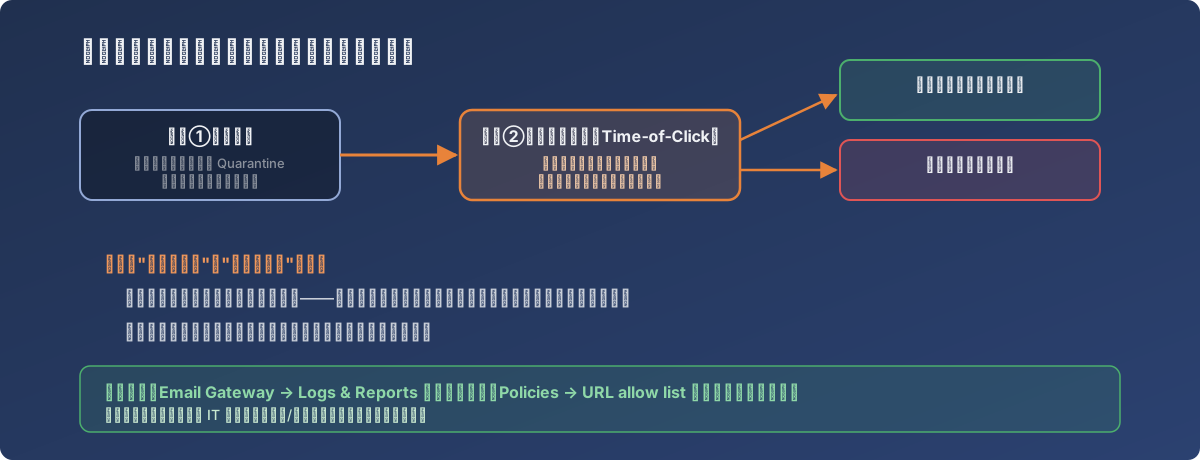
Verifying at click time closes the gap between delivery and click
This design targets a very real attack pattern: a malicious site might not be live yet when the email is sent, or it may temporarily mimic a legitimate page to slip past scanning — only turning into an actual phishing page days later, right when the recipient finally opens the email and clicks. A one-time scan at delivery can’t catch this kind of delayed-onset threat; a second check at click time closes that gap.
Depending on the verdict, clicking a link shows one of two outcomes:
- Low risk / unverified: a warning appears, with an option to proceed anyway;
- Medium/high risk: blocked outright, no way through.
Legitimate URLs that get wrongly flagged can be added to Policies → URL allow list, so business-critical links stop triggering repeated warnings.
A note on access control
The console’s Super Admin role is powerful (full visibility into every message, global policy control) and should go only to core IT staff. High-frequency day-to-day tasks — checking, releasing — should run through a more restricted account to keep the exposure of the high-privilege account small.
Lessons
- Email security isn’t a single point-in-time check — delivery-time scanning and click-time verification cover different attack windows; you need both, or one gap stays open;
- Quarantine management is ongoing operational work, not a set-and-forget config — regularly reviewing the queue and maintaining the allow/block list is what keeps the protection aligned with real business traffic;
- Plan access tiers up front: high-privilege accounts go only to who truly needs them; day-to-day operations run through lower-privilege accounts — basic security hygiene for any admin console.