

Consumer routers can do network segmentation too: setting up an isolated ASUS guest subnet

A small branch office or a temporary site with no budget for enterprise networking gear still needs a guest/dedicated-device Wi-Fi that’s fully isolated from the internal network. A consumer router (an ASUS RT-AX88U here) can do it — the underlying idea is the same as any enterprise solution: a separate subnet.
Wiring: the router as a second-tier gateway
- Connect the upstream network (a switch’s LAN port) into the ASUS router’s WAN port — not the LAN port. This one choice is what makes the ASUS operate as an independent second-tier gateway instead of just joining the existing subnet;
- Complete the Quick Internet Setup wizard and confirm it gets an address from the upstream network correctly.
Configuring the isolated subnet SSID
In the wireless settings, create a new SSID and, critically, give it an IP range different from the main subnet (leave the default SSID on the original subnet; put the new SSID on a fresh private range, e.g. 199.x.x.x):
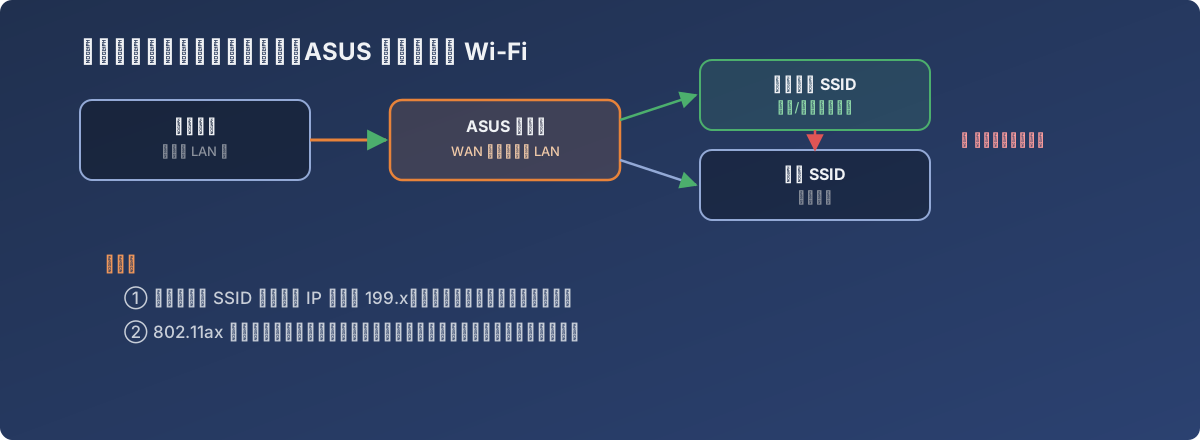
Two SSIDs, two subnets, the router isolates them in the middle
- Devices on the isolated subnet can talk to each other and reach the internet;
- But they cannot reach anything on the default subnet (file servers, printers, etc.) — exactly the point of the isolation;
- To move an SSID between subnets later (say, from subnet A to subnet B), just change the VLAN ID it’s bound to in the wireless settings — no rewiring required.
A compatibility gotcha worth noting
While configuring, the router firmware popped a warning: some older wireless adapters may have connectivity issues with the new firmware’s 802.11ax feature. If some legacy devices refuse to connect or drop repeatedly after an update, check whether their network adapter driver is badly outdated first — an easy warning to skim past, but a real compatibility risk this particular firmware update introduced.
Lessons
- Network segmentation isn’t exclusive to enterprise gear — any consumer router that supports multiple SSIDs bound to different IP ranges can produce a genuinely usable isolation setup, plenty for small sites and temporary projects;
- Connecting the upstream network to the WAN port is the key step that lets a consumer router act as a “second-tier gateway” — wiring it into the LAN port instead mixes every subnet together and the isolation becomes meaningless;
- Don’t skip the “some older devices may have compatibility issues” notes in firmware release notes — reading them upfront saves a round of troubleshooting when connectivity actually breaks.