

Giving an external partner access to one SharePoint folder doesn't require giving them an account
Internally, SharePoint holds files exchanged with external customers and vendors - but those external parties usually only need to upload or view a handful of documents occasionally. Provisioning a formal account and running a full enterprise guest-invite flow for that kind of low-frequency collaboration is clearly overkill. SharePoint’s external sharing has a lighter path built in: no Microsoft 365 account required, sign-in via a one-time email code, with access pinned to exactly one specific folder.
Inviting an external user: pin access to a single folder
- Find the specific folder to share, click the ”…” menu, and select “Manage access”;
- Choose “Share” and enter the external partner’s email address;
- Set the permission level - “Can edit” includes upload/create/delete/edit, “Can view” is read-only - grant whichever is the actual minimum the partner needs;
- Confirm and click “Send.” The partner receives an email with an access link.
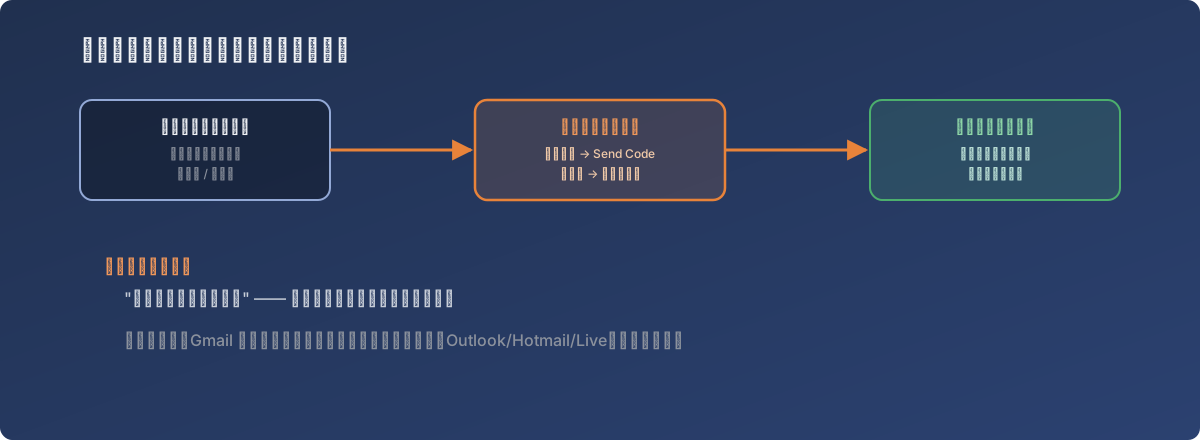
No account, no password - identity is proven by “this mailbox received the code,” nothing else
On the external side: a code, not a username and password
What the recipient does after getting the sharing email is just as simple:
- Click the link in the email and select “Open”;
- Click “Send Code”;
- Check their own mailbox for the system-generated one-time code;
- Enter the code and select “Verify” to land inside the authorized folder - visible and usable only for that one explicitly-granted folder, with nothing else on the SharePoint site exposed.
The underlying model here: identity is proven by “this mailbox can receive the code,” not by a username and password - so the external partner never needs to maintain a separate account outside their own organization, and no password ever travels through an email.
One wrinkle found in practice
The type of mailbox the external partner uses affects how smoothly this flow goes - accessing the link from a Gmail-type address occasionally ran into verification hiccups, while Microsoft-associated addresses (Outlook.com, Hotmail, Live) sailed through the code verification noticeably more reliably. If an external partner reports “the link won’t open” or “the code process gets stuck,” suggesting they try again from a Microsoft-associated mailbox is worth trying first.
Lessons
- The account overhead of external collaboration should scale with how often and how deeply it happens. SharePoint’s folder-level external sharing sits neatly in the gap between “provision a formal guest account” and “no access control at all” - a good fit for one-off or low-frequency external file exchange;
- The email-code sign-in grants access at the folder level, not the site level. An external user only ever sees the one folder explicitly shared with them - a default least-privilege boundary that requires no extra configuration to get;
- This class of lightweight external access can behave differently across mailbox providers - when a partner reports “it doesn’t work,” suspect their mailbox type before suspecting the permission configuration itself; it’s usually the faster path to a diagnosis.