

From Excel to Snipe-IT: the minimum viable way to digitize an IT asset register

The company’s IT equipment register (laptops, monitors, printers…) had always lived in a shared Excel sheet — several people with edit access, each responsible for updating their own branch or department. It worked, sort of, but the failure modes were the usual ones: half-finished edits forgotten mid-save, two people editing simultaneously and colliding, and numbers that never quite reconciled at finance’s stocktake. These aren’t problems “being more careful” fixes — Excel’s collaboration model simply doesn’t scale to this volume.
Why Snipe-IT (and not just any tool)
After evaluating a few options, the open-source Snipe-IT asset management system was chosen, for a few reasons:
- Self-hosted, keeping asset detail off third-party SaaS entirely;
- Built-in auto-incrementing fixed-asset tag numbers, solving Excel’s old problem of “the numbering scheme lives only in someone’s head”;
- Fine-grained permission tiers: admins can edit, regular staff get read-only accounts to self-check the devices assigned to them.
Landing order: draw the process first, pick the software second
The part of this rollout most worth recording isn’t “how to install Snipe-IT” — it’s that a complete asset-management process diagram was drawn before any of that (intake, checkout, return, retirement, stocktake — who owns each step, how state transitions). Software selection and configuration only started once that diagram was locked.
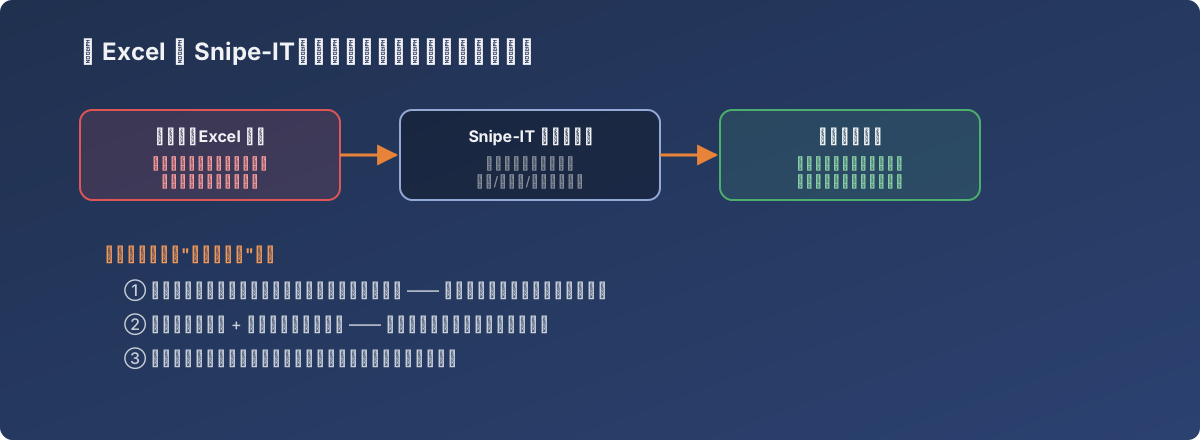
Software is the container for a process, not the process itself — get the diagram right and the software configures itself correctly
Concretely:
- Process diagram first: define the full lifecycle from intake to retirement, and who triggers each state transition and whether it needs approval;
- Bulk-import legacy data: tidy the existing Excel inventory into a standard format and import it as Snipe-IT’s starting state;
- Physical tagging in parallel: attach a matching asset tag (barcode/number) to every device — this is the only bridge between the digital record and the physical object. Skip this step and even a perfectly accurate system record can’t be reconciled quickly against reality at stocktake time;
- Open read-only access to a small group first: give departments that need to self-check device status a read-only account, watch whether the data gets used correctly and whether fields are missing, then widen the rollout.
An easily overlooked benefit: resource tagging for finance
Another driver behind this upgrade came from finance — fixed-asset tag numbers needed to map onto the finance system’s fixed-asset ledger accounts. In the Excel era that mapping was reconciled entirely by hand; in Snipe-IT, the asset numbering scheme could be co-designed with finance’s own numbering system up front, cutting reconciliation friction sharply. Worth remembering: the stakeholders for an asset management system aren’t only IT — finance is one too, and the numbering scheme deserves alignment before rollout, not after.
Lessons
- Software is the container for a process, not the process itself — skip the diagram and go straight to software, and you just move Excel’s chaos into the new system’s custom fields;
- Physical tags and digital records must advance together; either one getting far ahead of the other creates a fresh round of “the record doesn’t match reality”;
- A permission model should serve data quality — read-only access isn’t just “one fewer person who can break something,” it’s more eyes catching record errors earlier;
- Asset management can look like a purely internal IT system, but finance is often a real stakeholder — aligning the numbering scheme with them before launch is far cheaper than reworking it after.