

The e-signature quota ran out - but it wasn't any one person's quota. It was the whole company's shared pool

A user in Finance, trying to send an e-signature request, got a message: “You have reached the limit on the number of agreements you can send at this time. Please try again in XX minutes.” The instinctive reaction is usually “how could I possibly have sent that many” - but how this limit actually gets calculated has very little to do with what any one person sent.
First, figure out how this quota is actually allocated
Breaking down daily e-signature usage by department at the time showed:
- Finance/Accounting: roughly 185 transactions/day;
- Customer Service: roughly 38/day;
- Sales & IT: roughly 15/day;
- HR: roughly 5/day.
This e-signature service used a licensing model allocated centrally through the admin console - meaning the company’s purchased e-signature quota is, in practice, one pool shared across the entire organization, not a separate, independent allowance carved out per user or per department. Finance already had the heaviest daily usage by far, so the moment the company’s combined daily send volume hit the vendor’s rate limit, the error landed on whichever department or user happened to trigger that final request - regardless of who actually caused the problem.
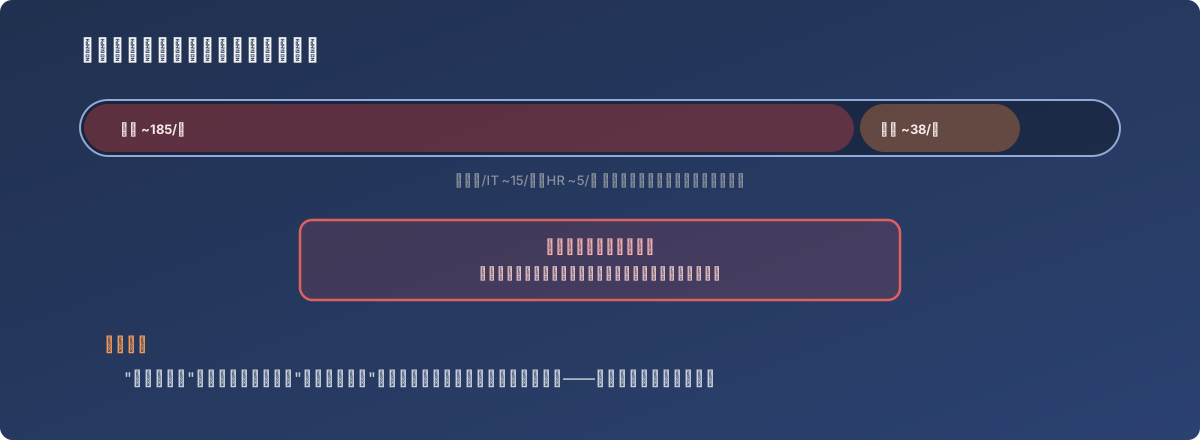
Whoever’s screen shows the error isn’t necessarily who caused it
Where this kind of shared quota tends to get overlooked
- The license count and the rate limit are two separate things. How many user seats were purchased and how many documents those seats can collectively send per day are two rules the vendor sets independently - procurement often only pays attention to the former;
- The quota is consumed at the pace of the whole company’s combined usage. A spike in one department’s volume (Finance’s month-end close, for instance) drains every other department’s headroom faster too, even if those departments’ own usage hasn’t changed at all;
- Whoever trips the rate limit is often the least responsible party. They just happened to be the last one to send a request that day - the thing actually worth tracking is the company-wide daily usage curve, not whichever individual got the error.
The fix
Understand the vendor’s rate-limit rules clearly (usually tracked at the account/organization level, not per user), stagger the heaviest-usage department’s (Finance, here) sending to avoid piling up at peak times, and if actual volume has consistently outgrown the current plan’s daily allowance, evaluate upgrading to a higher-tier plan rather than continuing to route around it with staggered timing indefinitely.
Lessons
- When “quota exceeded” shows up, first confirm what dimension that quota is actually measured on - per user, per department, or company-wide - since that determines who’s actually responsible and what needs adjusting. Assuming from the start that “this one user sent too much” would have pointed entirely in the wrong direction here;
- Usage peaks in a shared resource pool are a burden every user of that pool bears together. One department’s usage spike innocently pushes every other department closer to the rate limit - a dependency that’s easy to overlook during procurement and only becomes visible once it causes a problem;
- A SaaS service’s “license count” and “usage rate limit” are two separate dimensions - it’s worth asking about both at purchase or renewal time, not just the former. This kind of rate limit is rarely documented prominently, but when it’s hit, it affects whoever needs the feature most at that exact moment.