

Azure AD password sync silently dead for four days: new password on-prem, old password in M365

The user report sounded like superstition: “I changed my password. My PC accepts it, but Outlook and Teams want the old one.”
That symptom points somewhere very specific: password synchronization between on-prem AD and Azure AD is broken — directory objects still syncing (so accounts look normal), but password hashes stopped flowing up, leaving Azure AD holding the old hash.
Confirming it
Microsoft 365 admin center → Health → Directory sync status, and there it was:
| Item | Status |
|---|---|
| Directory sync | On |
| Last directory sync | 13 minutes ago (healthy) |
| Password sync | On |
| Last password sync | 4 days ago (in red, with a Troubleshoot link) |
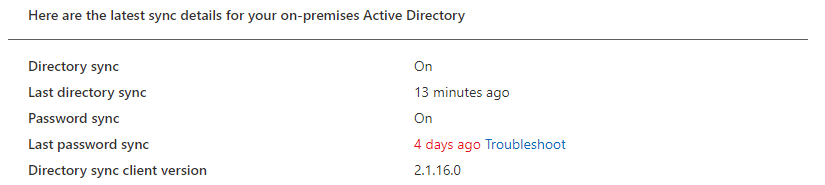
The Directory sync status page at the time (actual screenshot) — that red “4 days ago” is the whole answer
Directory sync ran 13 minutes ago; password sync froze four days ago. They are independent channels — one being alive says nothing about the other.
Root cause
On the Azure AD Connect server, working through Synchronization Service Manager, the cause turned out to be almost comical: the sync account’s password had expired.
The domain’s password expiry policy applied itself to that account like any other. The moment it expired, password hash sync began failing silently — no dialog, no email, nothing — except that red line in the admin center.
The fix
- Set the sync account’s password policy to never expire (as service accounts always should be);
- Trigger a full sync on the AAD Connect server:
Start-ADSyncSyncCycle -PolicyType Initial- Watch Last password sync flip to “minutes ago” on the status page, then have the reporting user confirm the new password works in M365.
Microsoft has a dedicated troubleshooting doc (the admin center’s Troubleshoot link goes there); the event-log route — 611/650/651 series events — localizes password sync failures fast. Worth bookmarking.
Lessons
- Service accounts: never-expire + strong random passwords. Letting human password policy govern service accounts is a time bomb;
- Directory sync healthy ≠ password sync healthy — monitor the two timestamps separately;
- Another entry in the “no alert means no monitoring” file — the admin center’s Directory sync status page earned a spot on the weekly checklist (same treatment as the RSP backup check);
- When a user says “only my old password works,” don’t assume they’re confused — that sentence is a precise technical signal.