

The deployment wizard said 'success', but the broker insisted no deployment existed - rebuilding an RDS farm

The company decided to fully upgrade RDS (Remote Desktop Services) to Windows Server 2025, building an entirely new farm - a new connection broker, new RD Web Access, new session hosts - to replace an RDS environment that had served for years. Following Microsoft’s standard flow through the “Add Roles and Features” wizard in Server Manager: choose Remote Desktop Services deployment, Standard deployment, session-based deployment, tick off connection broker, Web Access, and session host roles in sequence, Deploy.
The progress bar completed, prompting a server reboot to finish the installation. After coming back from reboot, nothing was right anymore.
After “deployment succeeded,” the deployment itself no longer existed
The Remote Desktop Services overview page in Server Manager delivered a flat, cold line: “A Remote Desktop Services deployment does not exist in the server pool.” Confirming via PowerShell:
Get-RDSessionCollection -ConnectionBroker RDS-BROKER.corp.localreturned a wall of red text:
A Remote Desktop Services deployment does not exist on RDS-BROKER.corp.local. This operation can be performed after creating a deployment…
The wizard had explicitly reported all three role services installed successfully; after one reboot, the system flatly denied this deployment had ever happened. A clue sat in Server Manager’s task details: an “Automatic Refresh” task marked as failed, with a more specific error attached -
The WS-Management service cannot process the request. The computed response packet size (516467) exceeds the maximum envelope size that is allowed (512000).
Root cause: a default value too small, never touched on a fresh server
WinRM (Windows Remote Management) enforces a cap on the size of a single response payload, defaulting to 500KB (512000 bytes). On a freshly installed Windows Server 2025 machine, that value is still the out-of-the-box default; and a configuration operation like an RDS deployment - which involves multiple roles coordinating across multiple servers - exchanges enough state information between the two servers that at certain moments it just barely exceeds this default ceiling (516467 bytes in this case, less than 1% over). Once a request exceeds the limit, it gets rejected outright, and Server Manager’s “refresh” operation fails repeatedly as a result - the deployment wasn’t actually gone; the communication channel responsible for reporting the deployment’s state had been cut off by its own default configuration.
The fix is to raise this ceiling on both servers:
Set-Item WSMan:\localhost\MaxEnvelopeSizekb 8192
Restart-Service WinRM
The gap the wizard left behind had to be patched by hand from the command line
After raising the limit, Server Manager still showed “deployment does not exist” - the GUI’s state had never actually been written correctly, and the deployment had to be re-declared manually via PowerShell:
Import-Module RemoteDesktop
New-RDSessionDeployment `
  -ConnectionBroker "RDS-BROKER.corp.local" `
  -WebAccessServer "RDS-BROKER.corp.local" `
  -SessionHost "RDS-HOST1.corp.local"
After running it, reopening Server Manager finally showed the deployment in its correct state - the connection broker, Web Access, and session host role services could all be queried and managed normally, and subsequent steps (creating session collections, adding a second session host, configuring certificates) went smoothly.
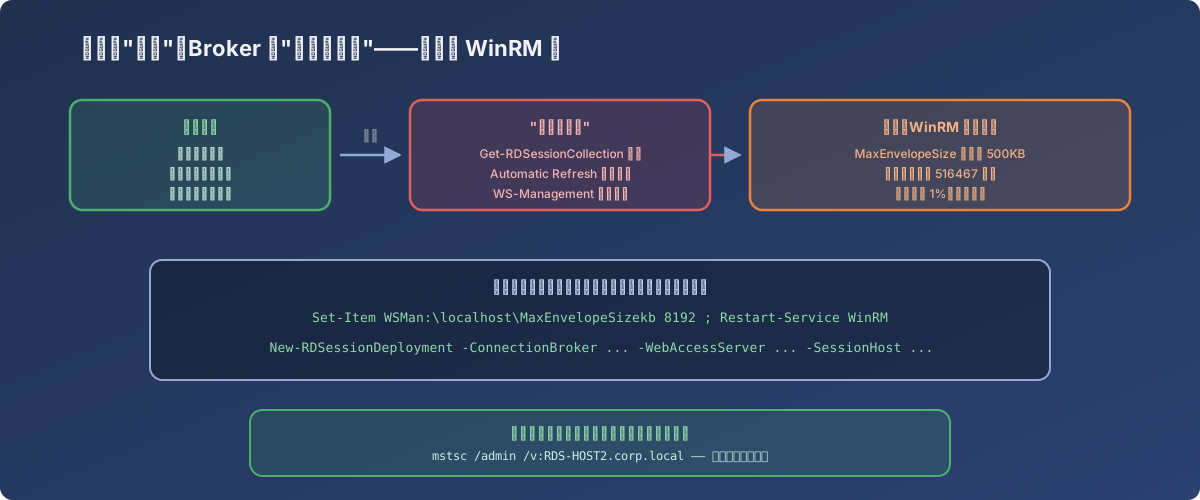
The wizard’s “success” only meant it detected no failure on its own end; the real state was never synchronized
A second gotcha noted along the way: no direct connections by computer name inside a farm
With the farm built, IT tried to remote directly into one of the session hosts for maintenance - typed the hostname into mstsc, and got:
The remote computer rds-host2 that you are trying to connect to is redirecting you to another remote computer named RDS-HOST1.corp.local. Remote Desktop Connection cannot verify that the computers belong to the same RD Session Host server farm. You must use the farm name, not the computer name…
This is the RD Connection Broker’s session redirection mechanism at work: a plain RDP request gets redirected by the broker to whichever host in the collection the load-balancing policy picks, and the client sees the target flip from “the machine I asked to connect to” into “a different machine,” refusing the jump out of caution. The error message itself already contains the answer - add the /admin flag to bypass the collection’s load-balancing logic and connect directly to the specified machine:
mstsc /admin /v:RDS-HOST2.corp.localLessons
- On a freshly installed server, WinRM’s default limits may not fit the operation you’re about to perform. Multi-role, multi-server coordinated deployments (RDS, clustering, complex GPO sync) can exchange enough inter-server state to exceed WinRM’s out-of-the-box payload size default; when something “mysteriously fails with no direct error,” it’s worth checking WinRM’s own events and limits;
- A deployment wizard’s “success” message doesn’t mean the state was actually persisted. The GUI’s refresh logic depends on the underlying communication working; when the communication layer breaks, the wizard may have already done what it thought it should, but subsequent queries see an empty deployment - at that point, don’t doubt the operation itself, go check the service actually responsible for transmitting state;
- When the GUI won’t cooperate, the PowerShell module usually still has an entry point to declare state manually. Cmdlets like
New-RDSessionDeploymentare the same API the wizard calls behind the scenes - when the GUI is stuck, you can call it directly instead; - Inside an RDS farm, connecting directly to a specific session host as an admin requires the
/adminflag. Without it, the RDP client follows the collection’s load-balancing redirect logic and lands you on a different machine - that’s deliberate design, not a malfunction.