

From unboxing to ready-to-use: the first attempt at scripting PC provisioning

Getting a new (or freshly reimaged) PC ready for use walks through several steps: rename the machine, install common software, map shared drives, add a printer, migrate the Outlook profile… none of these steps is individually complex, but repeat them across several machines and half a day disappears. Documenting the thinking behind the first attempt at automating this is more useful than the script itself.
First, decide what can be automated and what can’t
The provisioning steps split roughly into two categories:
- Pure configuration actions (rename the machine, install software, map a network drive, set a default printer) — these are deterministic: fixed inputs, predictable outputs, naturally suited to scripting;
- Steps requiring human judgment or interactive authentication (a user logging into a system with their own credentials on the spot, confirming a device model on site) — these can’t be fully automated, but the “what to do at this step” can at least be written down clearly to cut hesitation and lookup time.
Scope of the first attempt: eat the most time-consuming part first
The first version of the automation script didn’t aim for “fully automatic.” It covered the highest-repetition steps first:
- Rename the computer (
Rename-Computer); - Silently install a batch of common software (using installers with silent-install flags, so nobody has to babysit “Next” buttons);
- Map the fixed shared drive paths;
- Configure the default printer.
What it didn’t cover (business system client installs, account permissions, Outlook mailbox configuration) was left to a human — these steps have too many variables (different roles need different system permissions, different mailboxes) to force into version one of the automation without adding complexity and error risk.
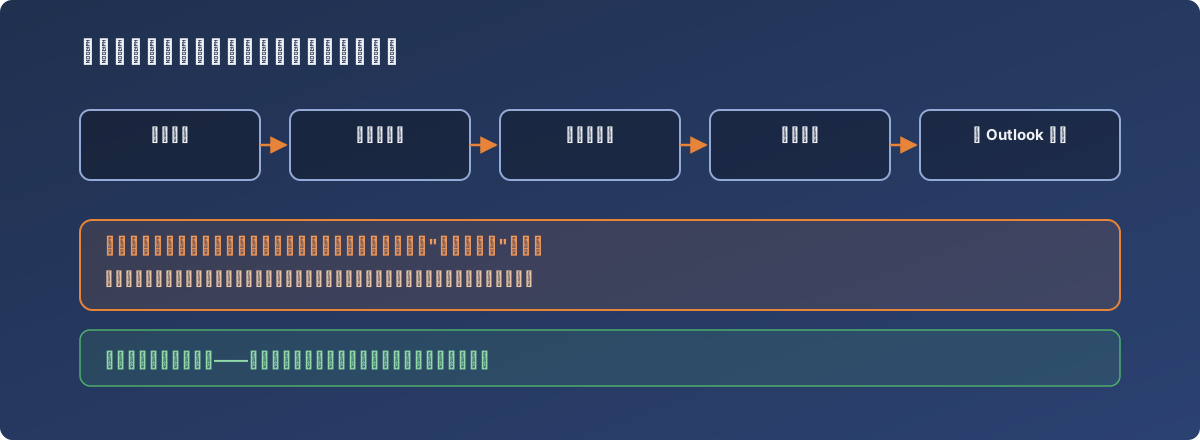
Automation doesn’t need to be all-or-nothing — eat the most time-consuming half first
Lessons
- The first version of an automation doesn’t need to cover the whole process — pick the highest-repetition, most deterministic steps first; that’s where the return on effort is best;
- Steps involving identity/permission judgment calls are safer left manual in version one — forcing them into automation before the edge cases are understood tends to cause more problems than it solves;
- Even when only half the process is automated, the remaining manual half should be written up as a clear checklist — the script handles speed, the checklist handles completeness, and you need both for a genuinely complete solution;
- The value of a first attempt isn’t a perfect script — it’s learning which parts are worth automating and which aren’t, yet. That understanding outlasts the script and shapes every iteration after it.