

A USD payment failed bank validation - the ERP was matching on IBAN, not the receiving account

A payment failed bank interface validation with “invalid account,” even though checking the payment system’s own records showed the receiving account information was entirely correct. The odd part: the recipient was a USD account, which shouldn’t leave much room for “is the account correct” to go wrong in the first place.
Two systems, matching on two different fields
Investigating revealed the two systems disagreed on which field should be used for matching:
- The Payment Engine side had always matched bank records using the standard Receiving Account field;
- The ERP system (SAP Business One) side, if the corresponding business partner master data also had an IBAN filled in, would prioritize matching on the IBAN instead of the receiving account.
The account behind this failed USD payment happened to have an IBAN number filled into its business partner master data - but IBAN (International Bank Account Number) is a coding scheme that only applies to banking systems that use it (the eurozone, for instance); a USD account should never have had this field populated at all. The ERP applied its own priority rule and tried to match against this IBAN that shouldn’t have existed, naturally failed to find a match, and validation failed as a result.
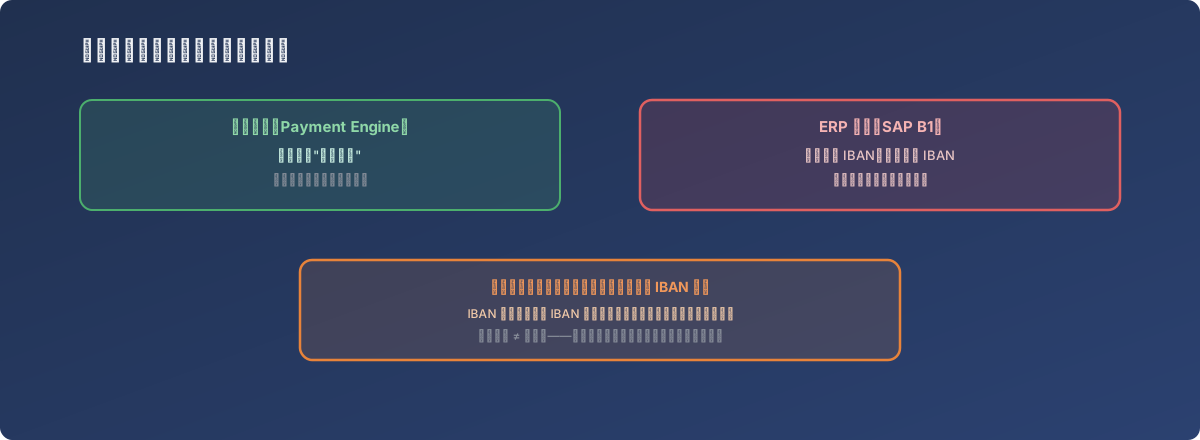
A wrongly filled field doesn’t fail immediately - it only surfaces the moment something actually relies on it
The fix
The unnecessary IBAN field was removed from the ERP’s business partner master data, leaving only the standard receiving account information. With no IBAN left to prioritize, the ERP naturally fell back to matching on the receiving account, and validation resolved. The applicable scope was also clarified: only business partners using euros, where the bank itself requires an IBAN, should have this field populated at all - accounts in other currencies shouldn’t carry this information along by habit.
Lessons
- A field being fillable doesn’t mean it should be filled. When maintaining master data, populating every field that looks vaguely relevant seems like it makes the data more complete - but if a downstream system has implicit priority logic tied to whether a specific field exists, that extra field can trigger an unexpected error at some future point;
- When two systems integrate, which field should be used for matching needs to be explicitly confirmed, not assumed to default to the same thing. The payment engine and the ERP here actually applied different matching priorities to the same business partner data, and without that difference documented, the root cause is nearly impossible to spot from the surface-level error alone;
- When troubleshooting “the data looks correct, but validation still fails,” it’s worth checking whether some other field is hijacking the matching priority that the correct field should have had. The receiving account here was correct the entire time - what was wrong was the mere existence of a different field.