

A self-hosted Moodle wouldn't send notification emails - it took three port combinations to find the right one

Once a self-hosted Moodle learning platform went live, the first thing that broke wasn’t course content - it was email delivery. Learners completing a course were supposed to trigger an automatic notification email, but nothing ever arrived. Checking Moodle’s mail-related settings confirmed site email and web settings were both enabled - the problem persisted regardless.
Trial and error: switching ports, still nothing
Moodle’s “Outgoing mail configuration” page bundles several interdependent SMTP parameters: host address plus port, SMTP security (encryption method), and SMTP Auth Type. The first attempt used the default port 25 with no encryption - failed. Switching to port 587 with TLS encryption and PLAIN authentication - still nothing.
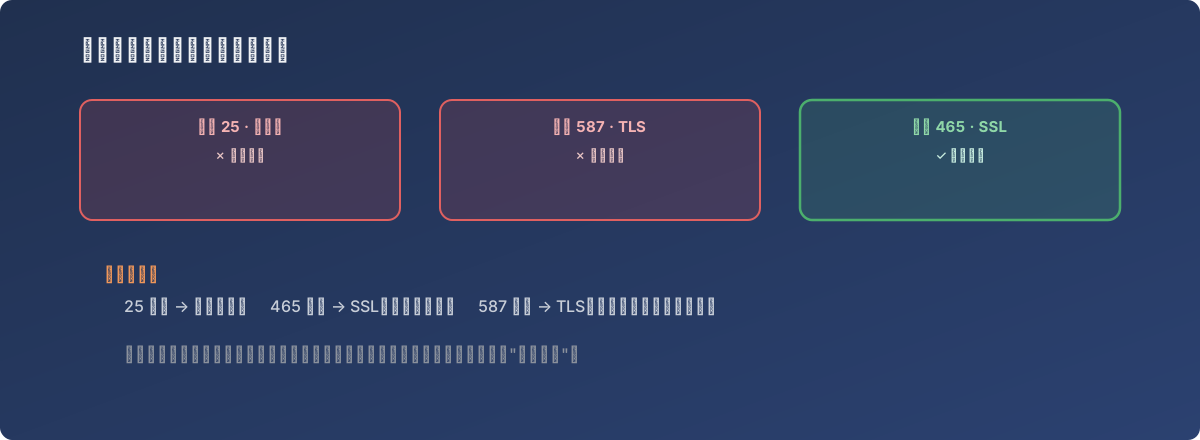
“Email is enabled” and “email actually gets delivered” are separated by a whole set of parameters that has to match exactly
Root cause: these SMTP parameters have to line up precisely
In SMTP send configuration, port number and encryption method aren’t interchangeable - each port corresponds to a specific encryption protocol: port 25 is typically unencrypted, port 465 pairs with SSL (encryption starts immediately on connect), and port 587 pairs with TLS (a plain connection first, then upgraded to encrypted). Behind these three combinations, the mail server only accepts whichever one it’s actually configured for - if the client (Moodle, here) gets the port/encryption pairing wrong, the server either refuses the connection outright or fails authentication, and the error message rarely spells out “port and encryption method don’t match” - it just shows a generic send failure.
The combination that finally worked was port 465 with SSL encryption, paired with the authentication credentials the mail server required. Both earlier attempts failed for the same underlying reason: the port/encryption pairing didn’t match what this particular mail server actually supported.
The fix
In the Moodle admin panel, under Server → Email → Outgoing mail configuration, the SMTP host was set to mail-server-address:465, SMTP security was set to SSL, and the authentication username/password the mail server required were entered. After saving, test email delivery worked normally.
Lessons
- “Email is turned on” isn’t the same as “the email configuration is correct.” Moodle’s own mail toggle only controls whether it tries to send email at all - whether it actually succeeds depends entirely on getting the SMTP parameters to match, which is a separate concern easily conflated with the first, wasting troubleshooting time;
- The SMTP port-to-encryption mapping is worth memorizing: port 25 is typically unencrypted, port 465 pairs with SSL, port 587 pairs with TLS. When email won’t send, confirm which combination the target mail server actually supports first, rather than cycling through ports one at a time;
- For this class of “parameters must match exactly” configuration, the failure message usually doesn’t help. Rather than guessing repeatedly against a generic “send failed” error, it’s faster to just ask the mail service provider directly which port, encryption method, and auth type it expects - that saves far more time than trial and error.