

The self-hosted mail server ran out of storage - the root cause was one employee's Outlook setting

A self-hosted mail server (SmarterMail) triggered a disk-space warning. The standard response to this is purging spam or expanding storage - but before diving into cleanup, the more useful first step was checking which account was actually consuming the most space. That pointed at a single account using the POP3 protocol.
Investigating: how one account ate this much space
POP3 and IMAP handle “where the email actually lives” in fundamentally different ways: IMAP keeps the server and client in sync - delete on one side and it disappears from the other. POP3’s default behavior is to download mail to the local client, and if “leave a copy of messages on the server” is checked at the same time, that server-side copy sticks around indefinitely unless an auto-cleanup rule is set separately.
Opening this account’s Outlook settings revealed the issue: “Leave a copy of messages on the server” was checked, but “Remove from server after N days” was left off. In other words, for years this account had been downloading mail locally while simultaneously piling up an ever-growing, never-cleaned copy on the server - that, not some one-time spam flood, was the actual reason disk space had been quietly disappearing.
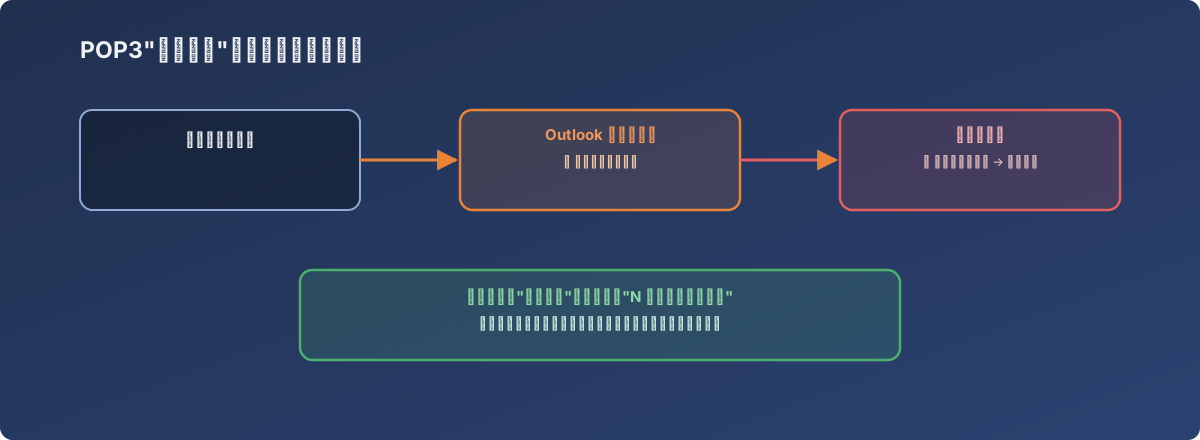
On the client side, the mail’s already “received” - on the server side, it was never actually deleted
The fix
In the account’s Outlook advanced settings, “Leave a copy of messages on the server” was kept checked (to avoid breaking mail delivery to other devices), while “Remove from server after N days” was enabled with a concrete number set (7 days, in this case). This preserves the multi-device sync behavior the user relied on while preventing indefinite accumulation on the server.
Lessons
- When a mail server’s storage alert fires, the first step should be identifying which account is consuming the most space, not immediately expanding storage or purging indiscriminately. The root cause here was isolated to one account’s client-side setting - adding disk would only have deferred the problem, not fixed it;
- POP3’s “leave a copy on the server” option is an unbounded trap by default. Most users check it so they can see mail on both phone and PC - few realize that without a paired auto-cleanup rule, server storage grows without limit;
- If a self-hosted mail server accepts both POP3 and IMAP, IT is better off auditing every POP3 account’s server-side cleanup setting proactively, rather than waiting for a disk alert to go hunting for the cause. This kind of exposure typically takes years to accumulate to the point of triggering an alert - the earlier it’s caught, the cheaper the cleanup.