

Every day around 5pm, RemoteApp sessions dropped en masse - the culprit was 2FA's own private timer

Users reported getting disconnected from RemoteApp consistently around 5pm. The first instinct was to check RD session timeout settings - which turned up nothing: no active session duration limit was configured, and it wasn’t an idle timeout either - an idle timeout would have shown a distinctly different message (“your session was terminated because it received no input”), and that wasn’t the error users actually saw.
Two “timeout” suspects ruled out, and the problem was still there
- Checked the RD session collection’s Active Session Limit: not configured;
- Checked the Idle Timeout: the error wording didn’t match, ruling this out too.
With the two most obvious suspects both eliminated, the problem got harder, not easier - if neither of the two most common timeout mechanisms is the cause, what’s actually cutting these sessions off?
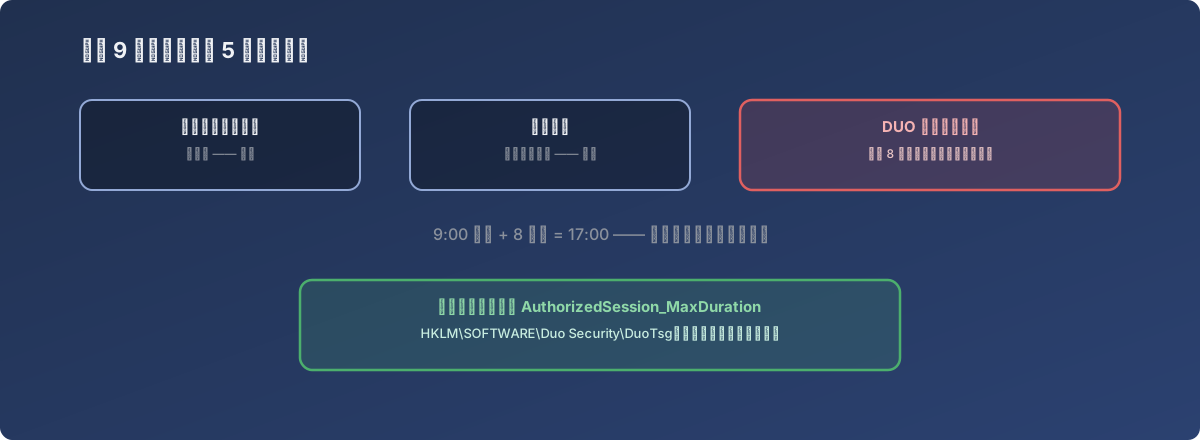
When the familiar suspects are all cleared, the answer is usually somewhere you never thought to look
The actual timer: the 2FA service’s own session duration cap
Searching for similar symptoms revealed this class of “everyone disconnects at the same fixed time of day” behavior is a known issue when using Duo two-factor authentication in front of RD Gateway - Duo sets a default 8-hour Authorized Session Max Duration for sessions passing through RD Gateway, and this timer starts counting down the moment a user completes 2FA, entirely independent of whether the session is active or being used. If most users habitually log in around 9am, 8 hours later lands right at 5pm - which is exactly where the daily, predictable pattern of mass disconnects came from.
This class of problem is hard to diagnose precisely because it doesn’t belong to any timeout layer in Windows or RDS at all - it’s a separate timer the 2FA service maintains independently after the session is established. Routine troubleshooting of RDS settings would never naturally point in this direction.
The fix
The vendor officially documents how to change this default (explicitly labeled “unsupported, use at your own risk”): on the RD Gateway server’s registry, under HKEY_LOCAL_MACHINE\SOFTWARE\Duo Security\DuoTsg, create a new DWORD value AuthorizedSession_MaxDuration and set the new session duration cap in minutes (780 minutes, or 13 hours, in this case). AuthorizedSession_IdleTimeout can be adjusted alongside it (set to 6 hours here). The registry was backed up both before and after the change.
Lessons
- A symptom that occurs at a fixed time of day, broadly and consistently, is itself an important clue. If disconnects were sporadic and isolated to a few users, the direction to investigate might be network quality - but when disconnects cluster tightly around the same time and affect a wide range of users, it strongly suggests some timer counting down from a fixed starting point, not random network noise;
- Security components layered on top of an existing system (2FA, SSO gateways, etc.) often carry their own session-management logic entirely independent of the underlying system. The session timeout here was never controlled by any RDS/Windows setting at all - a security component’s own session policy is a common blind spot in exactly this kind of “spent a long time troubleshooting and found nothing” problem;
- When the familiar suspects have all been ruled out but the problem persists, the next step is asking “what other layer in this chain haven’t I considered yet,” rather than re-doubting the options already eliminated. The answer here was hiding in the one link of the authentication chain that’s easiest to overlook.