

After the fingerprint server died completely, the reader at the front door turned out to be the only 'backup'

A BioStar (Suprema) fingerprint access-control system that had run for years reached the point where the server software had to be reinstalled from scratch - and at the database level there was no usable backup. By all conventional logic this meant re-enrolling every employee’s fingerprints. Until one fact surfaced:
The fingerprint terminal at the main door is a standalone device, and it stores user data and fingerprint templates locally. The server was dead; the door had kept opening every day - the data inside the device was alive. It was the backup.
Step one: stand the server software back up
The reinstall itself had two small traps worth recording:
- This generation of BioStar depends on .NET Framework 3.5, which has to be added via Server Manager first or the installer won’t proceed;
- After installation the service bound itself to a 169.254.x.x APIPA address (multi-NIC machine; the service picked a port with no DHCP), so the client had to connect to that IP first just to get in. Only after a restart with the extra NICs disabled did the service settle onto the proper static LAN address. Old client/server software binding to the wrong NIC on a multi-homed server is a recurring classic.
Step two: pull 237 users back from the door device
With an empty server running, add the device - the main-door terminal was auto-discovered at its LAN IP. Then the pivotal operation: Get user from device.
First a cautious pull of User ID 1 to confirm the data structure was intact and the fingerprint template was there. Then the full pull: all 237 users, fingerprints included, came back to the server. At that moment the worst case - re-enrolling the entire company - was off the table.
Step three: the device has staff IDs, but no names
The next problem surfaced immediately: what the device stores is essentially User ID (staff number) plus fingerprint template - the name fields were empty. 237 “numbered ghosts” who could open doors, with nobody knowing who was who.
HR had no complete ID-to-name mapping either - at enrollment time nobody had imagined the server dying. The only usable clue that could be dug up was an access-log CSV exported for one full month in April 2020 - every swipe record in it carries both the staff ID and the name.
So we did something inelegant but effective: clean the two-year-old access log into an ID-to-name mapping table and feed it back through BioStar’s import feature.
Step four: the import had more traps than expected
Almost every step of that import had a temper:
- The raw CSV had spaces and duplicate IDs; importing directly made the preview show only 5 rows, inexplicably - after cleaning and dedup, with field auto-mapping, it suddenly accepted everything;
- A small pilot batch of already-departed users went first (nothing to lose if it corrupted them), confirming names actually landed on the right IDs before scaling up;
- Spot checks then caught a real trap: while writing names, the import overwrote each user’s validity/expiry date with NULL - the import file had no such column, and the behavior for missing fields isn’t “skip”, it’s “clear”. Fortunately fingerprint templates were untouched;
- Even a 3-row import ran painfully long - imports in software of this vintage aren’t bulk SQL; they walk business logic row by row.
The tail end was closed out by an HR colleague manually keying in the remainder that couldn’t be matched - automating ninety percent and hand-finishing the last ten beat grinding toward 100% automation.
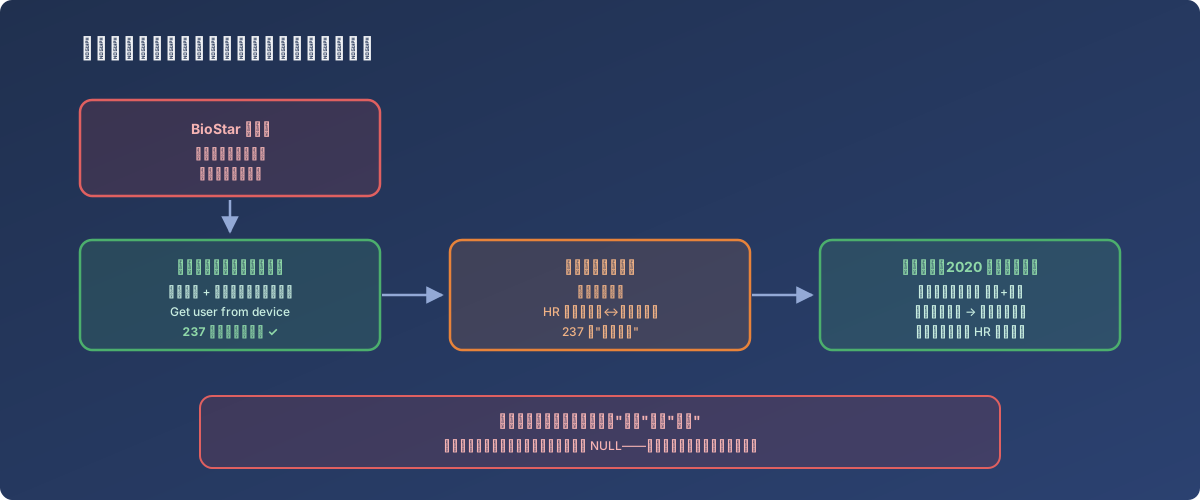
The “feature” of device-local storage became the lifeline on the day the server died
Lessons
- In client/server access-control systems, the devices themselves are a distributed backup - user data and biometric templates live on-device; when the server dies, the first instinct should be “don’t touch the devices” - they are the last remaining data source;
- Keep the ID-to-name mapping somewhere independent of the access-control system - devices typically store IDs only, and if HR has no mapping either, recovery means archaeology through historical logs like ours;
- Old software’s import features may overwrite fields you didn’t supply rather than skip them - pilot with a disposable batch first, and spot-check every field, not just the columns you imported;
- Access logs have value beyond auditing - periodically exported logs carry the ID-name mapping for free, effectively maintaining the reconciliation table; worth adding to the routine export-and-archive rotation.