

HikCentral Pro's one-way street: person data goes in, but it doesn't come out

The access-control platform in question is HikCentral Professional (Hikvision’s central management platform). The requirement that day was modest: export a human-readable list of the Person data in the platform - names, IDs, card numbers, validity periods - to reconcile against the HR roster and archive.
The conclusion up front: the feature doesn’t exist. But the process of confirming “it doesn’t” is worth writing down, because both paths that look like exits were walked to the end.
Path one: Back Up and Restore System Data
Server Management has a “Back Up and Restore System Data” option, and the platform was dutifully using it: the backup list held weekly scheduled Server backups plus a manually triggered one (progress bar marching honestly to 100%).
But these backup files are a black box with an entrance and no exit: the only operation the UI pairs with them is Restore - pick one, restore the whole system. There is no “open and inspect”, no “export as table”, no window anywhere that reads the person data inside. What it protects is “the platform can be resurrected”, not “the data can be taken out and used”.
A UI note spotted along the way: when the number of backups exceeds the configured limit, the newest backup silently overwrites the oldest - keeping a particular point-in-time archive means manually moving the file elsewhere.
Path two: Export Configuration Data
The same menu offers “Export Configuration Data”, which sounds more promising. It opens a checklist of exportable data types - and reading down the list is where hope faded:
- Encoding Device (name, address, port, serial number, firmware…)
- Video (areas/cameras, recording settings)
- Access Control Device (still device attributes)
- Security Control Panel, Network Transmission Device…
Every single entry is a device. Person appears nowhere. Selecting everything and exporting produced a 137-byte CSV - one header row, zero data rows (this deployment has no encoding devices anyway). The “configuration data” this exports is a device asset inventory, not business data.
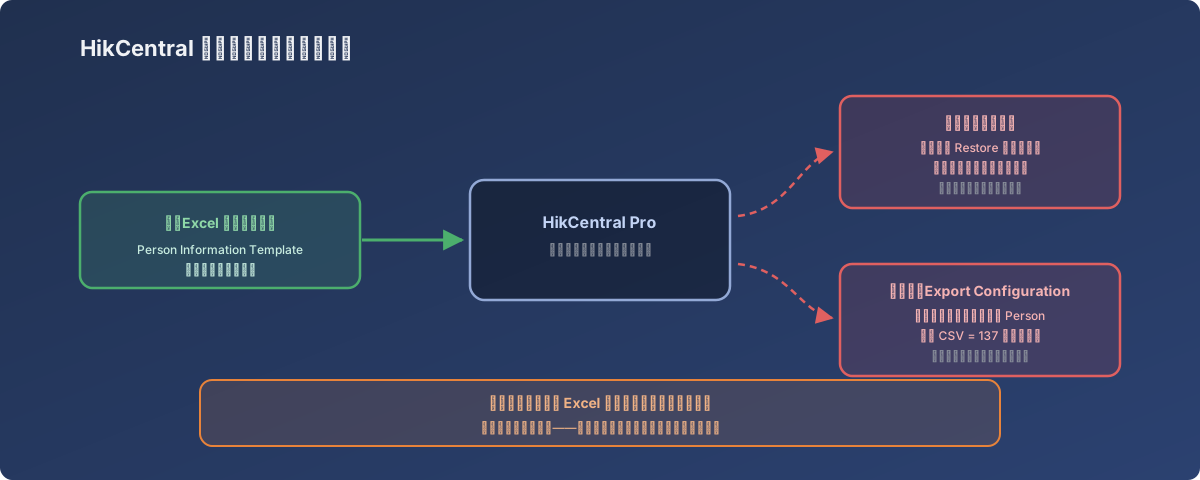
Person data flows in but not out - the kind of one-way street to identify during procurement, not after
The ironic contrast: import is a first-class citizen
The opposite direction works beautifully: HikCentral ships a standard Person Information Template (Excel), and bulk-importing people and issuing cards through it is a fully supported official flow - it’s exactly how this platform got populated with everyone in the first place.
In other words, it’s a one-way street: the vendor paved a smooth road for data coming in and built no road out. Once person master data enters the platform, it lives only in the proprietary database and in backup files that can only be Restored.
So how does the reconciliation get done?
The eventual answer is unglamorous but effective: treat the Excel file outside the platform as the master data. The template used for each bulk import is itself a person roster - archive it after every successful import, make all subsequent adds/changes in the file first and then in the platform, and run reconciliations between that file and the HR roster. The data inside the platform is a runtime copy, not the single source of truth.
Lessons
- When evaluating access-control/security platforms, put “can person data be exported in readable form?” on the procurement checklist - every demo shows how easy import is; nobody asks “in three years, when we migrate or audit, how does the data come out?”;
- “Has backups” and “data is portable” are different properties - a restore-only backup solves disaster recovery; it does nothing for reconciliation, audit, or migration;
- Menu items like “Export Configuration Data” deserve a click into the actual type list - what it exports may be a device inventory, not the business data you assumed;
- For one-way-street systems, maintain your own master data outside the platform - the import template file is naturally that master; adopt “change the file first, then the platform” and the missing exit stops being fatal.