

The security DVRs had been running on DHCP the whole time - until the day the address finally changed

A round of office re-cabling gave a natural excuse to check a few security DVRs’ network configuration - which is when it turned up that these DVRs had been assigned IP addresses via DHCP since the day they were installed, with nobody ever pinning them to a static address. Nothing had gone wrong in years, but that was luck: DHCP leases do tend to renew onto the same address with fairly high probability, but “high probability” is not the same thing as “will never change.”
Investigating: first figure out which address each device is actually using right now
The re-cabling moved the CCTV cabling onto a new switch port (LAN3). Rather than jumping straight into configuration, the first step was mapping the current state:
- Scan the subnet with Advanced IP Scanner to find each DVR’s current DHCP-assigned address;
- Record each device’s model and serial number, matching it against the scan results to confirm which physical unit corresponds to which IP;
- Once each mapping was confirmed, disable DHCP on each DVR’s own network settings page and switch to a static IP, keeping the address each unit was already using - so nothing referencing the old address elsewhere needed to be updated.
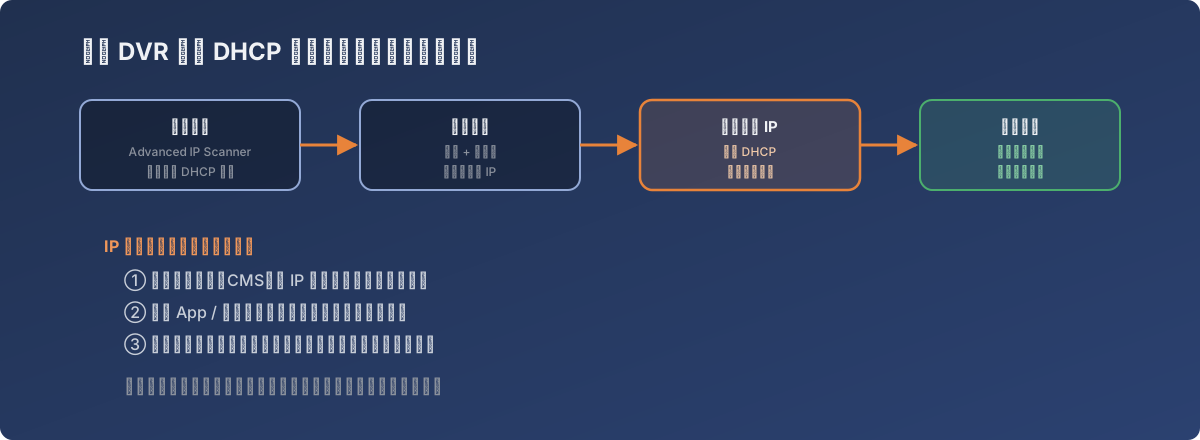
What a security device actually needs isn’t “connectivity” - it’s an address that never moves
Why this actually matters: a DVR’s IP gets referenced, not just connected to
When an ordinary office PC’s IP changes, the worst case is reconnecting to a shared folder. When a security DVR’s IP changes, it breaks everything that referenced that specific IP:
- Any entry added to a centralized management system (CMS) by IP silently loses its connection;
- Saved direct-access bookmarks in mobile apps or browsers stop working;
- Any port-forwarding or firewall rule that had been carved out for that specific device stops matching.
And this kind of disconnection usually isn’t noticed right away - it surfaces the day someone actually needs to pull footage from a specific point in time, which is exactly the worst possible moment for a device to turn out to be unreachable.
The fix
For each DVR whose model and serial number had been confirmed, the network settings page was opened individually, DHCP was unchecked, the address already in use was locked in as static, and all units were consolidated onto a dedicated surveillance subnet, separated from ordinary office endpoints.
Lessons
- “Nothing has gone wrong” and “the configuration is correct” are two different claims. A DHCP lease renewing onto the same address for years won’t throw any error on its own - the problem only surfaces the day a renewal actually lands somewhere else;
- Security devices (cameras, access control) should have their network identity treated as infrastructure, not left to automatic allocation - their IPs end up baked into management platforms, bookmarks, and firewall rules, and a single change ripples further than expected;
- A network re-cabling or migration is a cheap window for review - while the cabling is already being touched anyway, checking how key devices get their addresses costs far less than scheduling a dedicated audit later.