

Cutting the wrong wire during a domain cleanup: a hosting plan's display name is not what it actually serves

The company had been through several outsourced web developers over the years, accumulating a pile of domains and hosting plans of assorted origins. The task that day was perfectly reasonable: clean up these legacy assets, retire the domains and plans confirmed abandoned, stop paying for them.
Then the corporate website went offline.
The display name lied
The investigation found that the retired cPanel Hosting Gold plan carried a display name of an old, long-unused domain - by name, it belonged squarely in the “safe to drop” pile. But inside, that cPanel instance held the entire file tree of the live corporate website: the primary domain had been redirecting its traffic to the site hosted on that very plan all along.
Plan expired → host auto-suspended it → the website 404’d, and the email accounts on that cPanel got suspended along with it. A high-priority ticket went to the hosting provider to generate a renewal invoice and restore the plan - but restoration takes process time, and the site couldn’t just sit on an error page waiting.
No origin server - how do you make the domain “alive” again?
The situation: the origin was completely gone (hosting suspended), but the domain’s DNS lived on Cloudflare. That turns out to be enough - Cloudflare’s Redirect Rules execute at the edge and don’t need a functioning origin at all.
The interim plan: 302-redirect the primary domain to the overseas branch’s website, so customers searching for the company would at least not land on an error page.
Step one: make sure the DNS records are Proxied (orange cloud). Redirect rules only apply to traffic that passes through Cloudflare’s network. Create A records for the root (@) and www pointing at 192.0.2.1 - a dummy IP from the TEST-NET-1 range reserved for documentation. It never needs to be reachable; its only job is giving Cloudflare a proxiable record so traffic enters the edge network.
Step two: create the Redirect Rule. Rules → Redirect Rules → Create rule, matching Hostname equals the root domain OR www, action Static URL pointing at the branch site.
Step three (the critical one): pick status code 302, not 301. A 301 is permanent and gets cached hard by visitors’ browsers - after the origin comes back and the rule is deleted, returning visitors would keep bouncing to the branch site, and there is no way to purge that cache remotely. A 302 is temporary: browsers don’t cache it, so the moment the origin recovers and the rule is removed, traffic flows straight back.
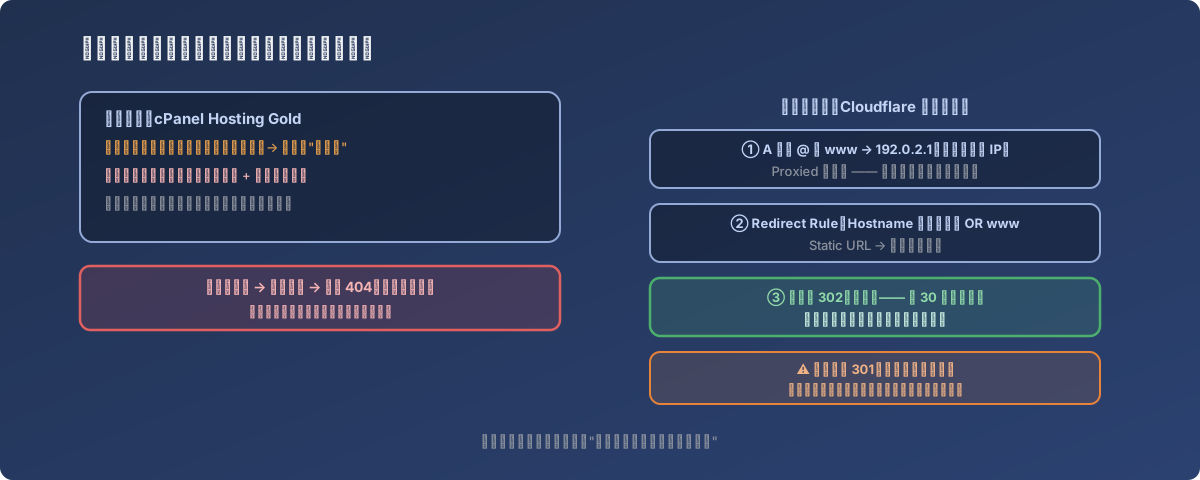
The rule went live globally in about 30 seconds - verified in an incognito window to dodge local cache
About half a minute after Deploy, both hostnames redirected correctly worldwide. The site went from “error page” to “temporarily pointing at the branch site”, buying time for the hosting restoration.
Lessons
- A hosting panel’s “display name” is just a label - it says nothing about what the plan actually serves. Before retiring any subscription, answer “if I stop this, what exactly disappears?”: open the cPanel and look at the files, check which DNS records point at it, confirm whether mailboxes hang off it;
- Cloudflare edge redirects need no origin server - the standard first-aid kit when a site is completely down: dummy IP 192.0.2.1 + Proxied + Redirect Rule rescues the domain from an error page within minutes;
- Emergency redirects are always 302 - a 301 gets permanently cached by browsers and cannot be recalled afterwards;
- Maintain your own renewal calendar instead of relying on the provider’s reminder emails - especially for old plans whose display name doesn’t match their real purpose. Their renewal notices are precisely the ones most likely to be dismissed as “noise about abandoned assets”.