

Downloading the backup isn't the finish line: restoring the whole website in Docker before daring to call it 'recoverable'

The corporate site had just been through an outage caused by a mistakenly-retired hosting plan (covered in another post). Beyond restoring the hosting, it left a lingering worry: would the backups we hold actually restore into a working website? A backup file sitting on a disk proves nothing - a backup that has never been fully restored is merely a suspected backup.
So we ran a complete restore rehearsal: using nothing but the backup files downloaded from cPanel, bring the entire Drupal site up from zero in local Docker.
First, get one thing straight: a Drupal site = folder + database
Drupal (like almost every modern CMS) splits a site into two separate halves:
- The folder: core code, themes, modules, plus user-uploaded media like images and PDFs (
sites/default/files); - The database: every article, every copy edit, every configuration setting, every user account - all of it lives exclusively in the database.
The golden rule: backing up only the folder backs up none of your content changes. Both halves are needed: the database exported as .sql from phpMyAdmin; the files, this time, via cPanel’s full account backup (.tar.gz).
Database first: a MariaDB container plus DBeaver for inspection
No database service installed locally - one command pulls up a MariaDB container:
docker run --name drupal-mariadb -e MYSQL_ROOT_PASSWORD=<local-throwaway-password> -p 3306:3306 -d mariadb:latestDBeaver connects to localhost:3306, creates an empty database, and executes the exported .sql. After the import, spot-check the key tables: the accounts in users and the media inventory in file_managed were all intact - the database half passes inspection.
One thing clarified along the way: the database contains no image files themselves, only paths and metadata (URIs like public://.../logo.png). The physical files live in the folder half under sites/default/files, and the two must line up.
The file half: the full backup wraps everything in an extra shell
After unpacking the .tar.gz, the site files were nowhere to be found at first - because a full account backup is structured differently from a hand-zipped public_html: the site lives one level down under homedir/, wrapped together with mail, SSL, logs and more. Once located, the whole site folder was copied to a short path on C:\ - partly so the Docker mount command stays clean, partly to dodge Windows path-length limits in deeply nested folders.
Three traps, each a classic
Trap one: the Windows read-only flag. Editing settings.php to point the database at the local container, the editor reported “saved” - but the file never changed. Drupal ships the file with the read-only attribute set, and the editor failed silently. Clear the read-only flag in file properties, edit again, save again - this time it actually wrote.
Trap two: localhost isn’t what you think. Once the web container started, it threw SQLSTATE[HY000] [2002] No such file or directory. This is a famous PHP quirk: when the database host is exactly localhost, PHP skips TCP entirely and looks for a local Unix socket file - and MariaDB lives in a different container, so that socket doesn’t exist. Change the host to host.docker.internal (the container’s dedicated name for reaching the host machine) and the connection came straight up.
Trap three: drupal:latest can’t run 2021-era code. The first attempt used the latest image and produced screenfuls of Deprecated and Fatal errors - the latest image ships PHP 8.x, and this Drupal 9.1-era codebase needs PHP 7.4. Remove the container and switch to a version-matched legacy image:
docker run --name drupal-web -p 8080:80 -v C:\<site-folder>:/var/www/html -d drupal:8-apachedrupal:8-apache natively runs PHP 7.4, and its web root layout matches the old code.
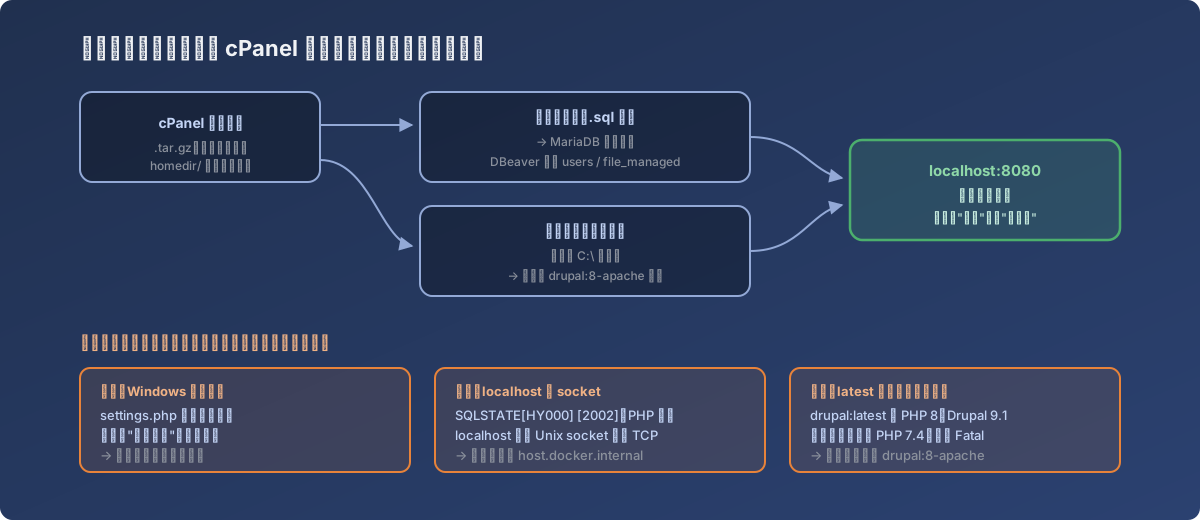
Each trap’s error message pointed somewhere else entirely; every real cause was an environment difference
Refresh localhost:8080 - the website rendered in full: sections, articles, images, everything in place. A few pink error blocks at the top (Twig cache failing to write into the Windows-mounted folder) disappeared after deleting the php/css/js cache folders under files and clearing the read-only attribute.
Lessons
- The only acceptance test for a backup is a complete successful restore - this drill amounted to a bare-metal recovery test; only after it can “the website has backups” be said with a straight face;
- When restoring legacy sites, match the container version to the code’s era -
latestimages are for new projects; legacy code needs historical images likedrupal:8-apache, and a mismatched PHP major version fails hard; - Memorize the three environment-difference traps: the Windows read-only attribute makes editors fail silently; PHP’s
localhostmeans Unix socket, not TCP - usehost.docker.internalacross containers; cache files carried over from the Linux server (Twig/PhpStorage) produce harmless but scary errors locally - just clear them; - A full account backup’s structure differs from a hand-zipped one - the site files sit under
homedir/, and the restore documentation should say so explicitly, sparing the next person the search.