

Patching an old Drupal site against Host Header spoofing - after two rounds against cPanel's file locks

One of the company’s older sites still runs on Drupal 9.1.5 + PHP 7.4, and its admin status report had been showing a security warning for years: Trusted Host Settings not configured. It’s the kind of warning that’s easy to scroll past as “another yellow line” - but behind it sits a very real attack surface: HTTP Host Header spoofing.
What this warning actually defends against
When a browser requests a website, the HTTP request carries a Host header telling the server “this is the site I’m looking for” - one server typically hosts many sites and relies on this header to route requests. The problem: many web applications implicitly trust whatever is in that header, and it’s trivially forgeable by the client.
An attacker sends requests directly to the server’s IP with a Host header pointing at a domain they control. If Drupal has no trusted-host list configured, it accepts the forged domain as its own. Two classic attacks follow from that:
- Password reset poisoning: the attacker triggers “forgot password” for an admin account with a spoofed Host header. Drupal builds the reset link using the fake hostname - the email the admin receives points to the attacker’s domain, and one click hands over the reset token;
- Cache poisoning: a request with a spoofed Host header gets cached by Drupal, and legitimate visitors are then served pages whose internal links all point at the attacker’s server.
The fix is cheap: append a trusted_host_patterns block to settings.php whitelisting your own domains. From then on, any request whose Host header doesn’t match gets an instant 400.
The actually hard part: two layers of locks
The configuration itself takes two minutes to write. But this site lives on cPanel, and the edit ran into two walls back to back.
Lock one: the file itself is 0444. Drupal deliberately sets settings.php to read-only (0444). Editing it in cPanel’s File Manager fails on save. Solution: temporarily change the file to 0644 to give the owner write access.
Lock two: the parent directory is locked too. With the file unlocked, saving failed again -
The system failed to create the file ”…/sites/default/settings.php.lock” … Permission denied
Before saving, cPanel’s online editor creates a temporary .lock file in the same directory to guard against concurrent edits. And Drupal doesn’t just lock settings.php - it locks the sites/default directory itself to 0555 (read + execute only), so the editor can’t even write its lock file. Solution: temporarily set sites/default to 0755; the save then went through immediately.
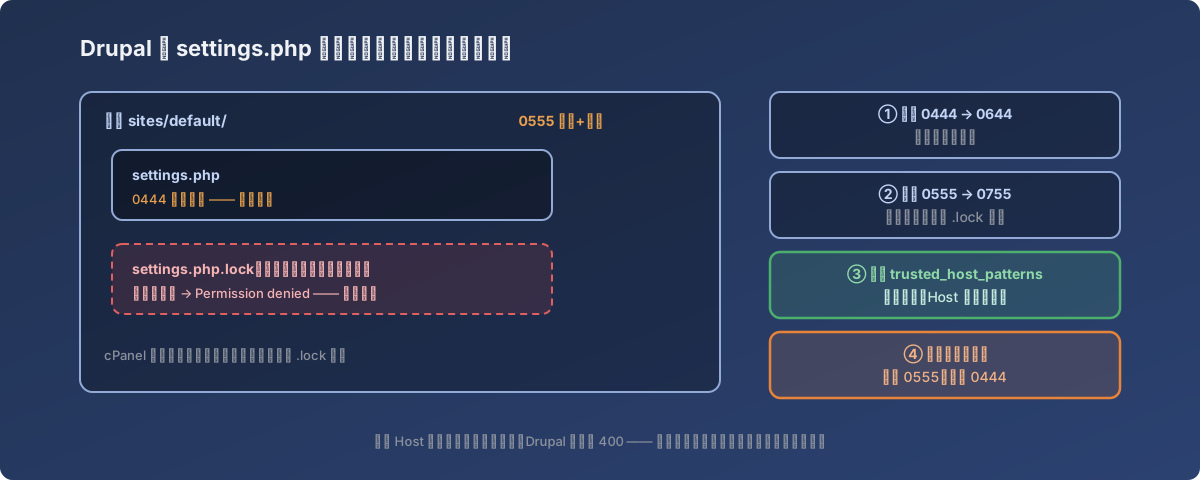
After the edit, both layers need to be locked back down
The cleanup matters as much as the edit: directory back to 0555, file back to 0444, restoring Drupal’s protection exactly as it was. A refresh of the status report page turned the years-old warning into a green checkmark.
The bad news confirmed along the way
While handling the warning, a quick version check delivered a less cheerful picture:
- Drupal 9 reached end-of-life in November 2023 - this site hadn’t received a single security patch in over two years;
- PHP 7.4’s security support ended even earlier, in November 2022;
- There is no one-click jump from 9.1 to the current Drupal 11 - it requires stepping through Drupal 10 and resolving deprecated code first. A proper migration project.
The trusted_host_patterns fix just closes one specific, cheap-to-close hole. The real cure is scheduling the migration.
Lessons
- Each security warning in the status report deserves the question “what does this actually defend against?” - “Trusted Host Settings not configured” sounds abstract, but it maps to two concrete attacks (reset poisoning, cache poisoning), and the fix is a few lines of config;
- Drupal’s file hardening is two-layered: file permissions plus directory permissions - online editors (like cPanel’s) typically need to write a temp file next to the target, so unlocking the file alone isn’t enough;
- Temporarily opened permissions must be locked back immediately - 0444/0555 is deliberate security design; restore it as part of the change, not “later”;
- On an EOL CMS and EOL PHP, fixing one warning doesn’t change the big picture - write it down, open a project, schedule the migration. Don’t let a green checkmark create a false sense of safety.