

Setting up a new Google Ads account: four gotchas I ran into
Building a Google Ads Search campaign from scratch for a client running a cross-border private-hire business. It sounded like a routine job — pick keywords, write copy, set a budget. Instead it went through four gotchas, from an account-level permissions bug to hidden traps buried inside the setup wizard. Writing them down here.
Gotcha one: Admin access with no billing access — two separate systems
The old account kept showing “Your account’s access level doesn’t include billing information,” even though the account itself had long-standing Admin access and wasn’t linked to any MCC. After a fair bit of digging, the root cause turned out to be that in-app Admin access inside Google Ads and “Payments Profile Admin” on payments.google.com are two entirely separate systems — being Admin in one doesn’t grant access in the other, and vice versa. No self-service fix was found, so the pragmatic path was creating a brand-new account instead.
Gotcha two: the new account’s country/timezone/currency follows the logged-in Google account, not the business
The new account’s setup got as far as “enter your payment details,” and the page showed country: Singapore, timezone: (GMT+08:00) Singapore Time, and a default budget denominated in SGD — but the client’s business is actually in Malaysia, running an MYR-priced service. A small, easy-to-miss line on the page said:
Time zone applies to your entire account and cannot be changed later.
That line is the real trap: get the timezone wrong, and there’s no going back. Fortunately this was caught before payment details were entered — the client re-selected Malaysia as the country and used a Malaysian card, which correctly landed the account as a genuine Malaysia-based account. That also generated a brand-new, different Google tag (gtag) ID from the old account’s — the site’s tracking snippet had to be swapped to match, or the new account would never see any data.
Lesson: before entering payment details on a new Google Ads account, confirm the country/timezone is correct — it’s the one setting in the whole flow with no “change it later” option.
Gotcha three: in the location picker, Enter doesn’t select what you’d assume
Setting up campaign location targeting, typing a place name pops up a list of matches, with the top row usually being the best match (e.g. “Selangor, Malaysia state”). The intuitive move seemed to be: press ↓ once to land on the first row, then Enter to confirm. In practice, that’s not what happens at all:
- Typing the name and pressing Enter directly (no arrow key) → selects the first item in the list;
- Pressing ↓ once, then Enter → actually selects the second item, not “move to the first item, then confirm.”
This counter-intuitive behavior meant that more than once, despite “Selangor, Malaysia state” clearly sitting at the top of the list, what actually got added to the campaign was something as tiny and meaningless as “Selangor Turf Club” — a neighborhood-level entry. On one occasion it even wiped the whole custom-location list down to a single country-level radio button by accident.
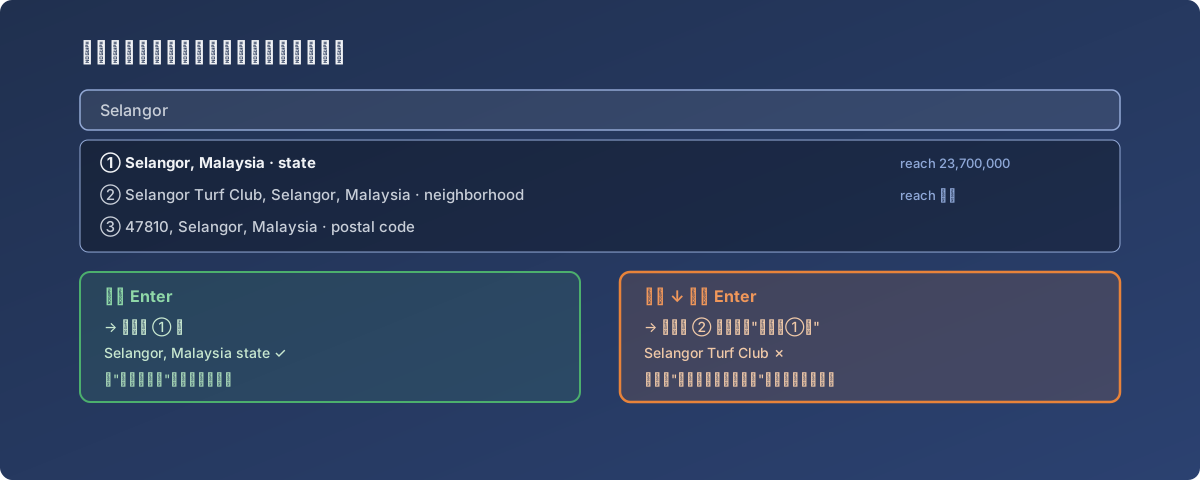
The option that feels “safer” is the one that actually picks the wrong place
Lesson: with autocomplete dropdowns like this, confirm exactly what “Enter” versus “arrow key + Enter” each select before relying on either — don’t assume based on intuition. Click the actual text with the mouse to verify once before deciding whether a keyboard shortcut is worth the risk.
Gotcha four: the ad was already running before payment details were even done
The client and this business had agreed on a specific test: run at a small MYR 25/day budget for a day just to see if there’s any exposure at all — with an explicit condition that nothing should go live until the client confirmed the budget. Every part of the campaign (copy, locations, budget) was fully set up; only the payment details had to be entered by the client themselves, which was also the one step in the whole flow that wasn’t handled on their behalf.
The flow reached its final step, “Agree and continue to your account” — which looked like it was simply finishing account setup. Clicking into the account right after showed the Campaign already Enabled, status “Bid strategy learning,” green dot — the ad was already running.
Fortunately it was caught fast enough: spend was still MYR0.00 with 0 impressions at that point, and the campaign was paused immediately with no actual cost incurred. Digging into it afterward made it clear: the new account’s “guided setup” flow behaves differently from the old account’s “manually create a campaign” flow — the guided flow auto-activates the draft campaign as its final step, with no explicit “confirm and publish” gate in between.
Lesson: right after completing any Google Ads guided account-setup flow, the very first thing to do is check the Campaigns list status — never assume a draft will stay a draft.
Closing thought
Strung together, these four gotchas are really the same underlying problem: the platform turns a lot of steps that should require explicit confirmation into silent defaults — defaulting to a country/timezone unrelated to the actual business, defaulting to selecting the second item instead of the first, defaulting to publishing the campaign for you. Each default probably makes sense for most users most of the time — but whenever it doesn’t match what you actually intended, the cost is either money spent in the wrong place, or a setting that can no longer be undone.
Next time a Google Ads account gets set up from scratch, these four points are going straight into a checklist to run through first: confirm the country/timezone, double-check every location entry one by one, and go straight to the Campaigns list the moment payment details are submitted.