

Migrating a mailbox from SiteGround to Zoho Mail, and lighting up BIMI along the way: three gotchas

Maintaining a website for a client running a cross-border private-hire business. The contact form has always used Netlify Forms to collect inquiries — notification emails land fine in the user’s own Gmail, but the ones addressed to the business’s own mailbox, booking@client-business.com, just vanished. Not spam-folder vanished — gone entirely. Chasing it down pulled on a whole thread: a DNS migration, a SaaS provider’s hidden free tier, and eventually a BIMI setup. Three gotchas worth writing down.
Gotcha one: DNS moved to Cloudflare, but mail routing never moved at all
The site’s DNS started out hosted at SiteGround, then got moved to the user’s own Cloudflare account — the upside was straightforward: no more dependency on the hosting provider’s DNS panel, and it made the later Netlify setup easier. The site itself worked fine after the move, until it turned out the contact form’s notification email to booking@client-business.com simply never arrived.
The first suspect was the form itself — and that search did turn up a real bug (the frontend’s fetch() was treating a 404 as a successful submission, so the form looked like it was working the whole time). Fixing that didn’t help; the business mailbox still got nothing. Running nslookup directly against the MX record made it clear: moving DNS to Cloudflare only changed who answers the query — the MX record’s actual value never changed, and it still pointed at SiteGround’s own anti-spam gateway, mx10/20/30.antispam.mailspamprotection.com. That gateway was flagging the mail as spam and quarantining it outright — not even landing in a junk folder.
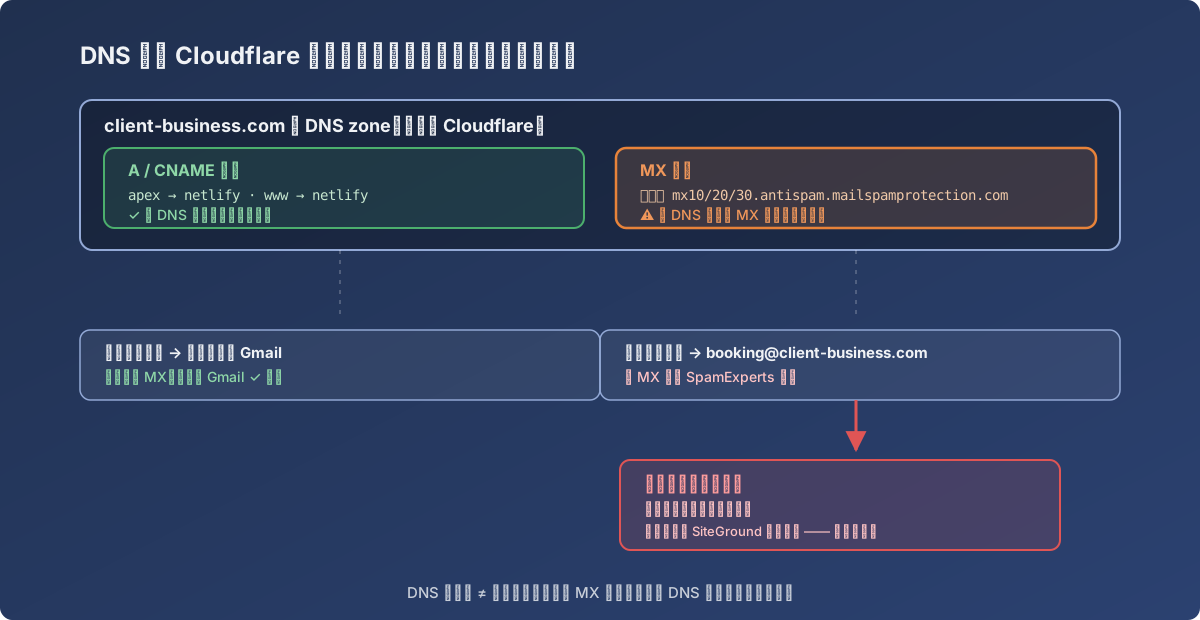
The A/CNAME records moved along with the DNS zone; the MX record’s value was never touched by anyone
Lesson: a DNS host is not the same thing as a mailbox provider. Moving DNS only changes who answers the lookup — as long as the MX record’s value stays the same, mail routing and whatever anti-spam gateway sits behind it are entirely unaffected. When email goes missing, run nslookup against MX first, before suspecting the code.
Gotcha two: couldn’t reach anyone at SiteGround, so the mailbox moved entirely — and Zoho’s free tier is buried
The proper fix for the gateway’s false positive was getting someone with SiteGround admin access to whitelist netlify.com, but that person was unreachable and couldn’t find anything useful in the gateway’s own logs either. After enough back-and-forth, the decision was to stop chasing that dead end and move the mailbox off SiteGround entirely.
Two options got compared: Cloudflare Email Routing plus Gmail’s “send as” (free, but fundamentally just forwarding — replies take a detour through that chain) versus Zoho Mail’s free/paid tiers. The client’s team was already used to checking mail through a browser webmail login, and Zoho’s free-tier webmail matched that habit more closely than a Gmail-forwarding setup would, so Zoho won out.
The actual gotcha showed up at signup: Zoho’s main signup flow defaults new users into the paid Mail Lite plan. The genuinely free Mail Free tier (5 users, 5GB each, no IMAP/POP/ActiveSync) is only reachable through a small, easy-to-miss “sign up” link sitting on the free-tier’s own dedicated page — the big button on the homepage never takes you there.
The client self-served the rest of the migration: MX switched to mx.zoho.com/mx2.zoho.com/mx3.zoho.com, and SPF, DKIM, and DMARC (landing directly on p=quarantine — strict enough) were all configured per Zoho’s own instructions, verified live via DNS lookup the same day.
Lesson: a SaaS provider’s free tier is often deliberately hard to find, because the paid tier is the default flow. Search “[product name] free plan sign up” directly — don’t expect the homepage’s big button to get you there.
Gotcha three: lighting up BIMI while at it — the logo was a JPEG with no transparency
DMARC was already at p=quarantine, clearing BIMI’s minimum bar (the protocol that shows a brand logo next to the sender’s name), so it seemed worth doing while everything else was already open.
BIMI requires the logo file to be in SVG Tiny 1.2 PS format. The brand badge on hand was a JPEG with solid black squares in all four corners — JPEG has no alpha channel, so there was no direct way to make those corners transparent. The first attempt was hand-drawing an approximate vector version, which the client rejected outright: “that doesn’t look like our logo.” So the approach changed: a small custom tool flood-filled the JPEG’s pure-black corner pixels to white in bulk, and that “background already cleaned up” raster image got embedded whole inside an SVG Tiny wrapper — the SVG itself draws no vector path at all, it’s purely a container, but as far as a BIMI validator is concerned, any legitimate, renderable SVG Tiny 1.2 file qualifies.
Publishing it was just one Cloudflare TXT record:
default._bimi TXT v=BIMI1; l=https://client-business.com/images/bimi-logo.svg;One thing was still missing at that point: Yahoo, AOL, and Apple Mail will show the logo as soon as DMARC clears the bar and the BIMI record exists, but Gmail additionally requires a VMC (Verified Mark Certificate) — which means registering a trademark first, then paying US$1000+/year for a DigiCert or Entrust certificate. At this business’s current scale, that spend wasn’t worth it, so it was skipped outright — Gmail users don’t see the logo for now, revisit once the business is bigger.
Lesson: not every “complete, by-the-book” step is worth finishing. BIMI itself is free and takes effect immediately on Yahoo/AOL/Apple Mail, but the Gmail-specific VMC requirement is a clear case of cost outweighing benefit — skipping it beats forcing it through.
Closing thought
Strung together, these three gotchas share one thread: moving DNS is not the same as moving mail, a SaaS provider’s free tier is often deliberately hidden, and “full compliance” can hide a cost that isn’t worth chasing. Next time an email-delivery problem like this shows up, the first move will be nslookup against MX and a look at the anti-spam gateway — not suspecting the code or the domain itself.