

Windows event logs default to 1 MB: by the time you need the evidence, it's overwritten

An audit requested historical RDS (Remote Desktop) connection records. Opening Event Viewer sank my heart: Microsoft-Windows-TerminalServices-RemoteConnectionManager/Operational ships with —
- Maximum log size: 1028 KB (yes, one megabyte)
- When maximum event log size is reached: Overwrite events as needed (oldest events first)
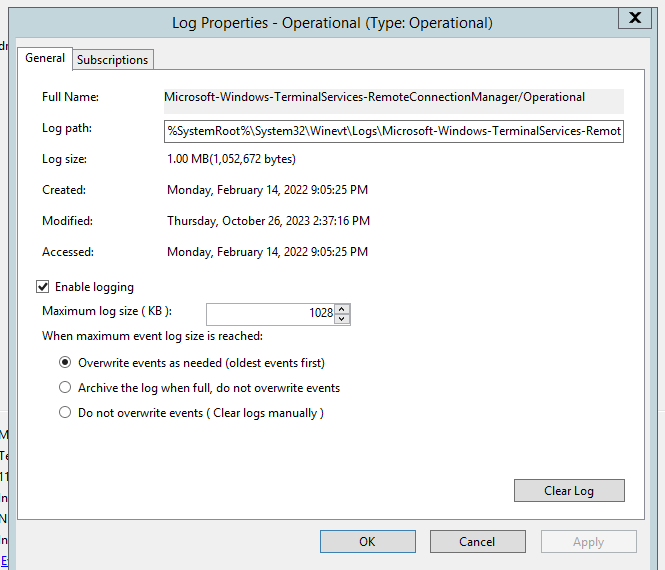
The scene of the crime (actual screenshot): a 1028 KB cap with circular overwrite — Microsoft’s default
On a busy RDS server, 1 MB holds a few weeks of connection events. Anything older? Overwritten, gone forever.
Which logs have this problem
It’s not just that one. Under Applications and Services Logs, plenty of Operational logs default to 1 MB circular overwrite — and they record exactly what audits ask about:
| Log | What it records |
|---|---|
TerminalServices-RemoteConnectionManager/Operational | RDS connection attempts and sources (Event 1149 = auth success) |
TerminalServices-LocalSessionManager/Operational | Session connect/disconnect |
Windows Logs/Security | Logon auditing (4624/4625) — larger than 1 MB by default, but often still short of retention requirements |
The change (five minutes after approval)
Event Viewer → right-click the log → Properties:
- Raise Maximum log size from 1028 KB (we sized it against log volume and retention targets — tens of MB covers a year-plus of RDS Operational events);
- Keep Overwrite (with the bigger cap) or choose Archive the log when full per compliance requirements;
- Screenshot before and after — the change record itself is audit evidence.
Or do it in bulk from the command line:
wevtutil sl "Microsoft-Windows-TerminalServices-RemoteConnectionManager/Operational" /ms:52428800   # 50 MB
wevtutil gl "Microsoft-Windows-TerminalServices-RemoteConnectionManager/Operational"                # verify
While you’re in there: a failed-logon watchlist
Since Event Viewer was open anyway, RDS-exposed servers got a Custom View for failed logons:
- Event log: Security, Event ID: 4625 (An account failed to log on);
- The fields worth reading in a 4625:
Logon Type 3(network logon), Status0xC000006D+ Sub Status0xC000006A(right username, wrong password — the classic brute-force signature), plus Workstation Name and Source Network Address; - Review it weekly alongside the RSP backup check; suspicious sources go straight into the firewall blocklist.
Lessons
- Log retention is before-the-incident work. Discovering inadequate retention when you need the data has no remedy — none;
- Add one line to the server commissioning checklist: review size caps on the key Operational logs. Five minutes;
- Audits want more than “the config is correct now” — they want evidence of the change process. Even a tiny retention tweak deserves its before/after record.