

SSH to a VPS suddenly refuses connections: check the panel before reaching for a reinstall

Connecting to a VPS on port 22 with PuTTY one day, and the connection is refused. This kind of thing tends to trigger a small panic — did the server crash? Do I need to open a support ticket for a reinstall?
First, separate “SSH is down” from “the server is down”
A VPS usually has two independent management paths:
- SSH (port 22) — runs through the OS’s sshd service; anything from key config, to an edited
sshd_config, to a firewall rule can break it; - Web console — provided directly by the VPS host, operating at the virtualization-platform layer, entirely separate from the SSH service inside the OS.
Logging into the web console showed the server itself running fine — CPU, memory, processes all healthy. The problem was isolated to the SSH layer alone (possibly a broken key configuration, an accidental sshd_config edit, or a firewall rule blocking port 22).
The fix: the panel’s own “reset SSH” feature
Most major VPS hosts (Hostinger, in this case) ship a dedicated self-service tool for exactly this, right on the Settings page:
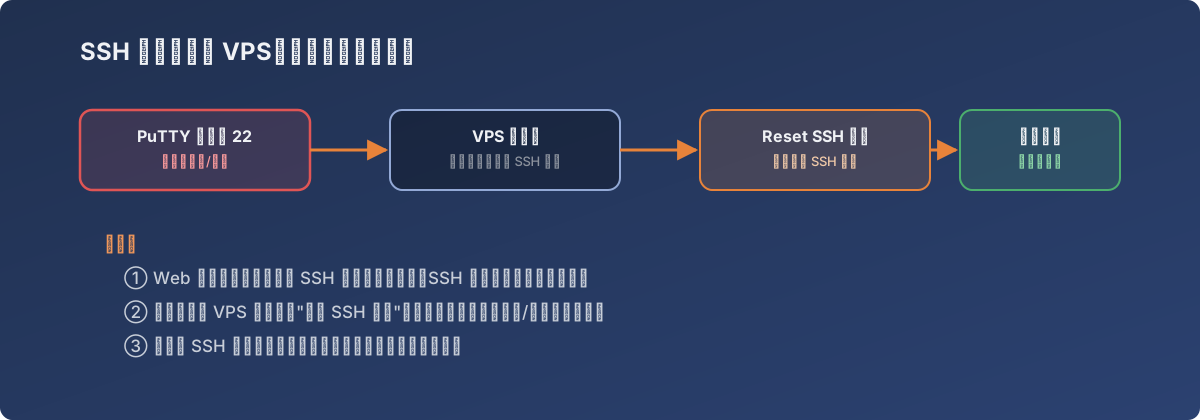
Two separate channels — SSH breaking doesn’t mean the whole machine is gone
SSH configuration — Reset your server’s SSH settings to your initial SSH configuration, in case you forget SSH settings or they no longer work.
Click Reset SSH, and within minutes the SSH service returns to its factory configuration:
- Only the SSH service configuration resets — disk data, installed software, and every other running service are entirely unaffected;
- After the reset, log back in via the initial method (typically password auth) and reconfigure key-based authentication as needed.
The same panel has a sibling feature, Reset Firewall (“in case your IP gets blocked”), addressing a different common scenario — the server’s own firewall accidentally blocking the very IP trying to manage it. Two separate features for two separate failure modes tells you both happen often enough in real operations to be worth knowing about.
Lessons
- The first step when SSH won’t connect is logging into the web console to confirm the server itself is alive — don’t jump straight to “the server is dead”;
- Know whether your VPS panel has a “reset SSH / reset firewall” self-service option — it can save the wait for a support ticket; a few minutes of self-service beats hours of waiting;
- These reset operations have clean, well-defined boundaries (config only, never data) — once you understand that, “reset” stops sounding scary and becomes just another tool.