

Installed a new face+fingerprint terminal, then decided NOT to install its management software - a decision worth writing down
The office got a new Hikvision face + fingerprint recognition terminal (a DS-K1T3-series access-control terminal) guarding one door. The device itself went in normally - wired to the LAN, factory default password changed, all routine. The next step by convention: install the companion iVMS-4200 management software on some PC and bring the device under software management.
Before installing, one extra question got asked: what problem does this software solve, and at what cost? The conclusion of that evaluation: don’t install it. The “no-deploy” decision process turned out to be more worth recording than the installation itself.
What the software can do
Once iVMS-4200 takes over a device, the logic is “software is authoritative, push to hardware”:
- Create users and enter card numbers in the software, push to the device, or read back from it;
- Build Access Groups to manage who can pass which door;
- After changing user properties (a name, say), go to Access Control, verify the change is ticked, then Apply all to device for it to actually land on hardware.
For a single device all of this “works”. The problem is the price.
The price: a dedicated workstation and everything it drags in
The key limitation: iVMS-4200 has no server/client architecture - it isn’t “server installed centrally, clients installed everywhere”. The software and its local database are welded to the one machine it’s installed on.
Which means if HR colleagues are to use it for day-to-day person management:
- A permanently-on dedicated workstation has to be provisioned for it;
- HR users can only operate it by RDP-ing into that workstation (multiple people sharing one machine);
- That machine becomes another full citizen of the estate needing patching, antivirus (one more license), asset tracking and backups;
- The software itself is a standing vulnerability surface - CVEs in security-management software are not rare.
And on the benefit side: we have one door.
What the terminal can do by itself
Then look at the hardware side: this terminal’s on-device enrollment of faces and fingerprints is already good enough - an administrator operates on the door-side screen, and enrolling, deleting and changing permissions can all be done there. No external software required; data lives on the device.
The decision matrix became clear:
- Single door + on-device enrollment suffices → don’t install the software, save a workstation and its whole maintenance chain;
- When would the software earn its keep? When multiple doors need centralized user management; when attendance records need extracting; when advanced configuration appears (time-windowed access groups, time-limited intern access, and so on). Deploy on that day - not sooner.
The boundary got written explicitly into the documentation, and the device’s LAN IP was reserved (even with no software connecting to it yet, that IP is not to be reused) - keeping a parking spot for the possible future deployment.
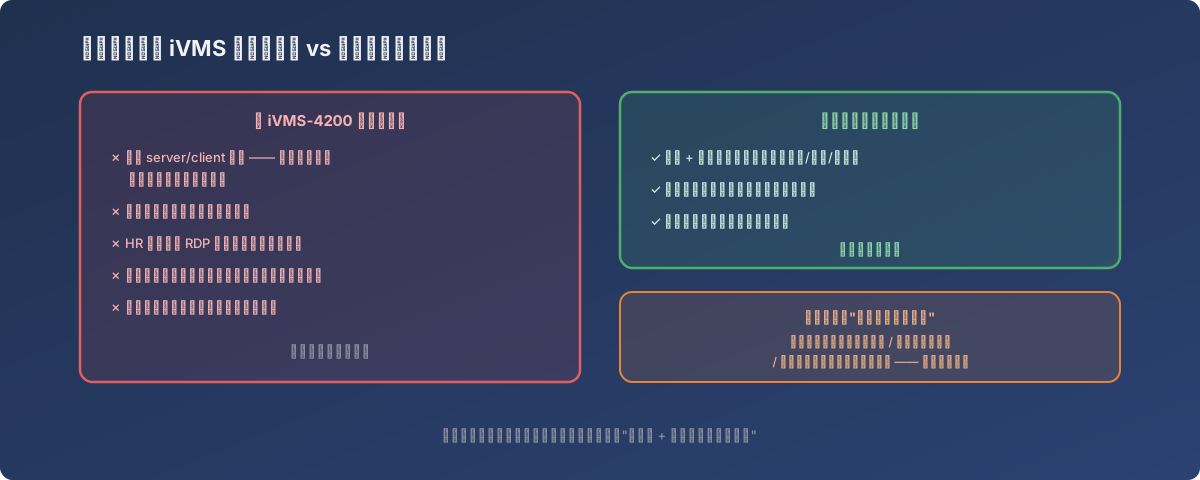
An architecture decision’s output isn’t necessarily a deployment plan - it can be “don’t deploy, and here’s what triggers re-evaluation”
Lessons
- “Companion software” is not a mandatory install - it’s a standalone architecture decision - ask three questions: do I currently have the problem it solves? Am I willing to feed the infrastructure it demands (dedicated machine, always-on service)? Is the attack surface it adds worth it;
- Management software without a server/client architecture carries a hidden cost of one entire dedicated workstation - plus the RDP-sharing operating model, patching, AV licensing and backups; all of that belongs in the “just install the software” accounting;
- Exhaust the device’s built-in management capability before reaching for host software - for single-door, low-churn scenarios, on-device enrollment often is the minimal architecture;
- Write down the reasons for not deploying and the triggers for re-evaluation - whoever inherits this in a few years (including yourself) should know it was a decision, not an omission; when a trigger fires (a second door, attendance requirements), upgrade by following the map.