

RDS certificate renewal: the full path for a wildcard cert (and three traps)

The RDS (Remote Desktop Services) SSL certificate was approaching expiry — certificate warnings for every user imminent. The replacement was the company wildcard certificate (*.example.com). Sounds like a five-minute job; several steps deserved writing down.
Trap 1: where is the pfx? Where is the private key?
The CSR for the wildcard was generated on a different server (the IIS box used for the original certificate request) — which means the private key lives there. Certificate files downloaded from anywhere else carry no private key and won’t work for RDS.
The correct path: on the server where the CSR was created, export the certificate together with its private key as a .pfx (with an export password). That pfx is what RDS needs.
Rule of thumb: can’t find the private key? Ask “which machine generated the CSR” — the key is always there.
Trap 2: the certificate name must match the external FQDN
A self-signed fallback certificate prepared as Plan B turned out to be issued to the internal name (rds.<internal-domain>.local), while users connect via the public FQDN (rds.example.com) — a name-mismatched certificate configures fine and warns anyway. The wildcard *.example.com covering the public name is the real answer.
The full list of places to change
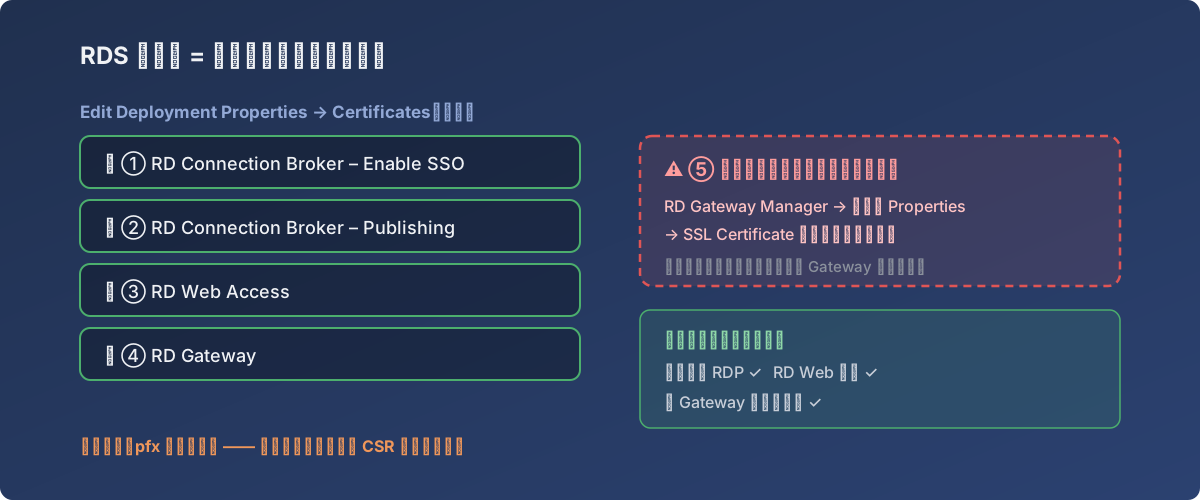
All five spots — the dashed box top-right is the one everyone misses
Server Manager → Remote Desktop Services → Overview → TASKS → Edit Deployment Properties → Certificates — four roles, one by one:
- RD Connection Broker – Enable Single Sign On
- RD Connection Broker – Publishing
- RD Web Access
- RD Gateway
For each: Select existing certificate → point at the pfx → password → Apply. All four green before moving on.
Trap 3: the straggler. With Deployment Properties done, one more independent spot remains:
Administrative Tools → Remote Desktop Services → RD Gateway Manager → right-click the server → Properties → SSL Certificate tab
This one does not follow Deployment Properties — import there separately. Miss it and the symptom is: Web and Broker fine, external connections through the Gateway still throwing certificate errors.
Lessons
- Keep a certificate inventory: which cert, where the CSR was generated, which machine holds the private key, expiry date. Scrambling through servers hunting a pfx at expiry time costs far more than maintaining the list;
- RDS cert replacement = four Deployment Properties entries + one RD Gateway Manager entry — five spots, checklist them;
- Verification covers three paths: direct internal RDP, RD Web login, and an external connection through the Gateway — walk all three before declaring victory.