

The five usual suspects behind repeated AD account lockouts: a field checklist

After a user changed her password, her account started locking repeatedly: unlock it, and minutes later it’s locked again. She swore the password she typed was correct — and she wasn’t lying. What locked her out wasn’t her at all, but something still retrying with the old password.
Having chased this a few times, the suspect list is remarkably stable. In order of hit rate:
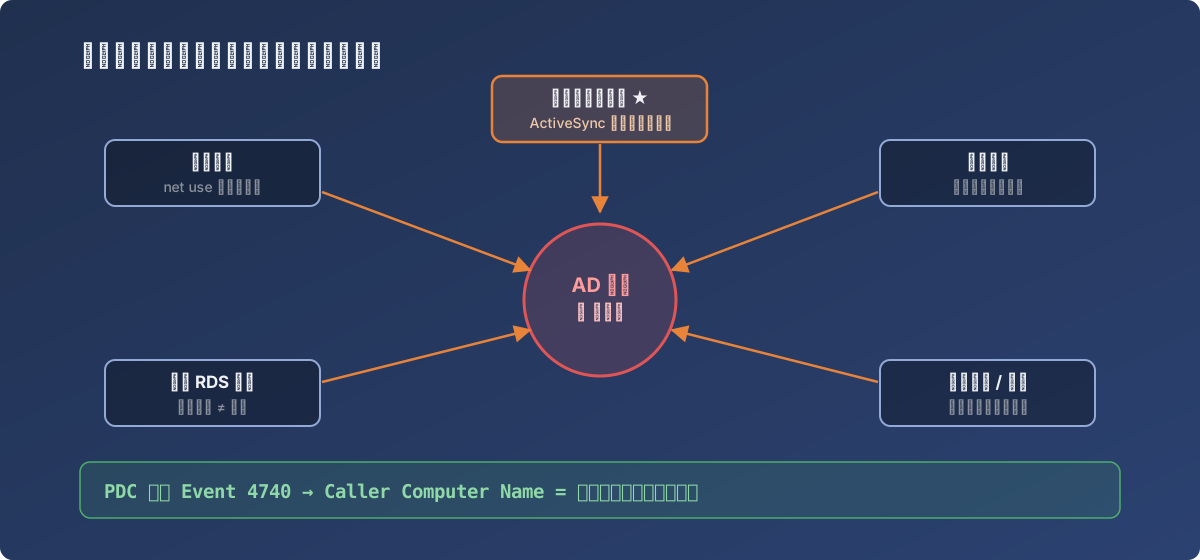
The five usual suspects — the phone mail client is the modern number one
The five usual suspects
- A mapped network drive — a drive mapping on some machine holds old credentials and keeps reconnecting in the background; a few failures trips the lockout threshold;
- A ghost RDS / Remote Desktop session — she was logged into some server before the password change and clicked “switch user” instead of signing out. That session lives on, its processes still presenting the old password;
- A phone mail client — ActiveSync / POP3 / SMTP configured with the old password, syncing every few minutes = locking every few minutes. The most common one in modern environments;
- A scheduled task — running as the account with stale credentials, contributing a failed logon on every trigger;
- Malware or brute force — a compromised machine hammering the account. Lowest probability, gravest consequences, must be ruled out.
Locating the source
Don’t guess — query. Lockout events converge on the DC holding the PDC emulator role:
# On the PDC: Event 4740 (account locked out); CallerComputerName = the culprit machine
Get-WinEvent -FilterHashtable @{LogName='Security'; Id=4740} -MaxEvents 50 |
  Where-Object { $_.Message -match '<username>' } |
  Select-Object TimeCreated, Message
The 4740 event’s Caller Computer Name names the machine the lockout came from. Go there and walk the suspect list:
net usefor mapped drives;quser/ Task Manager’s Users tab for ghost sessions;- Task Scheduler filtered by the account;
- For phones: have the user check every device with the company mailbox configured (tablets and old phones included).
Microsoft’s LockoutStatus.exe is also excellent — one view of the account’s lockout state and last failure source across all DCs.
Lessons
- Repeated lockouts right after a password change ≈ 100% stale credentials. Trust that hypothesis first;
- The proper password-change ritual includes: sign out of all remote sessions, update phone mail passwords, check mapped drives — three sentences worth putting in the user-facing guide;
- Event 4740’s Caller Computer Name is the shortest path — an order of magnitude faster than guessing machine by machine.