

Printer scan-to-folder suddenly failing: the killer is disabled SMBv1

The office multifunction printer’s scan-to-folder — scans dropped straight into a NAS share — worked for years, then failed out of nowhere. Printing still fine; only scan-to-folder broken.
Investigation
- NAS healthy; other machines reach the same share without issue;
- The printer’s target path and credentials untouched;
- A newer MFP tested against the same share — scans fine.
Old machine fails, new machine works. The arrow points firmly at protocol version.
Root cause: SMBv1
The old MFP’s firmware only speaks SMBv1 for file transfer. And SMBv1 is the protocol the entire industry has been executing since WannaCry — when the NAS and servers were hardened, the minimum SMB version went to v2, and the old printer was locked out from that moment.
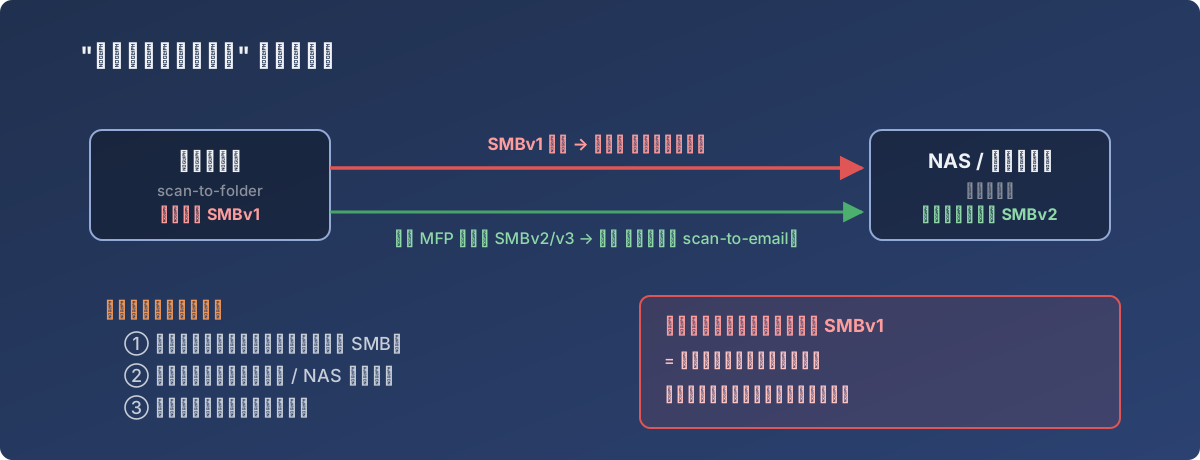
The mismatch in full — and why “just re-enable SMBv1” is never the shortcut to take
The classic fingerprints of this failure:
- Printing works, only scanning fails (printing doesn’t use SMB; scan-to-folder does);
- The timing lines up with a security hardening pass, a system update, or a NAS DSM/firmware upgrade;
- New devices unaffected, old devices die together.
Fix routes (in order of preference)
- Update the MFP firmware. The major vendors (Ricoh, Konica Minolta, etc.) later shipped firmware adding SMBv2/v3 — check the support site for your exact model. Ours hit a snag with the online firmware fetch and needed the package downloaded manually and pushed;
- For antiques with no SMBv2 firmware ever: switch to scan-to-email (SMTP, bypassing SMB entirely) or an FTP/SFTP target;
- Never re-enable SMBv1 on the NAS/server for a printer’s sake — that’s demolishing the security wall to open one window. If truly cornered, stand up an isolated legacy file server for it rather than downgrading the whole environment.
Also: the even older second machine involved was simply retired — the labor cost of life-support for a decade-old printer usually exceeds its residual value.
Lessons
- Before disabling SMBv1 anywhere, inventory the non-PC devices still using it: printers, scanners, old NAS boxes, door access systems — the easiest things to forget;
- “Printing works but scanning fails” = check SMB versions first. Saves an hour;
- Hold the line on security vs. compatibility: when a protocol deserves to die, let it die — find the old device another road, don’t resurrect the protocol.