

After the ISP's overnight 'maintenance', the overseas office went dark: config changed, IP swapped, not a word of documentation left behind

A message arrived early from a colleague at an overseas branch office: the office internet is down. The ISP’s explanation: they ran maintenance overnight, so the network “now needs reconfiguration, there is a new IP address” - and the office should contact “your internal IT”.
Translated: the ISP altered customer-side access configuration during overnight maintenance - the public IP changed - with no advance notice and no documentation of the new settings.
Monitoring had the objective timeline first
External monitoring (UptimeRobot) had already logged the incident: the ping monitor against the branch’s public address showed no response starting at 03:37, and by the time the office reported it, the outage had run past 7 hours. The 24-hour uptime figure had dropped to 68%, with an Ongoing incident sitting in the list.
That third-party timeline proved useful in the follow-up conversations with the ISP - “when did it actually go down” was no longer a matter of competing recollections; the monitoring data is a neutral witness.
The remote-support deadlock
This office has no local IT - all technical support is remote. And this incident was a textbook deadlock:
- Remoting in to fix the configuration requires a computer in the office that can reach the internet;
- The thing that’s broken is precisely the internet.
The theoretical workaround: have someone onsite tether a desktop (still wired to the LAN) through a phone hotspot and remote in through that. But the more realistic assessment was this: the new access parameters existed only inside the ISP’s own records - static IP, gateway, DNS had all changed - and no one on the customer side could conjure them. A change like this should be configured by the ISP’s own technician, onsite, carrying the new parameters.
So the request went back to the ISP: send a technician. Friday evening, their engineer arrived with his own laptop, plugged straight into the modem, configured it, and the network came back.
But - not a single line of documentation was left behind. In the onsite colleague’s words: “the IT person brought their own laptop and connected it to the modem to set it, and then it’s fixed, they didn’t info anything else.”
Copying the config back afterwards
The network was up, but “the configuration exists only on the ISP technician’s laptop” was not an acceptable end state: at the next incident (or the next round of “maintenance”), internal support wouldn’t even have a baseline of the current setup.
The following Monday, a remote follow-up: with the onsite colleague’s help, TeamViewer into one of the branch PCs, log into the office’s Linksys router, and record the new WAN configuration in full - the static IP (a /30 block), the default gateway, both DNS servers - all screenshotted and archived. While in there, verified that the router’s remote management endpoint on the new public IP was reachable directly from HQ, so future router-level issues no longer depend on having someone onsite.
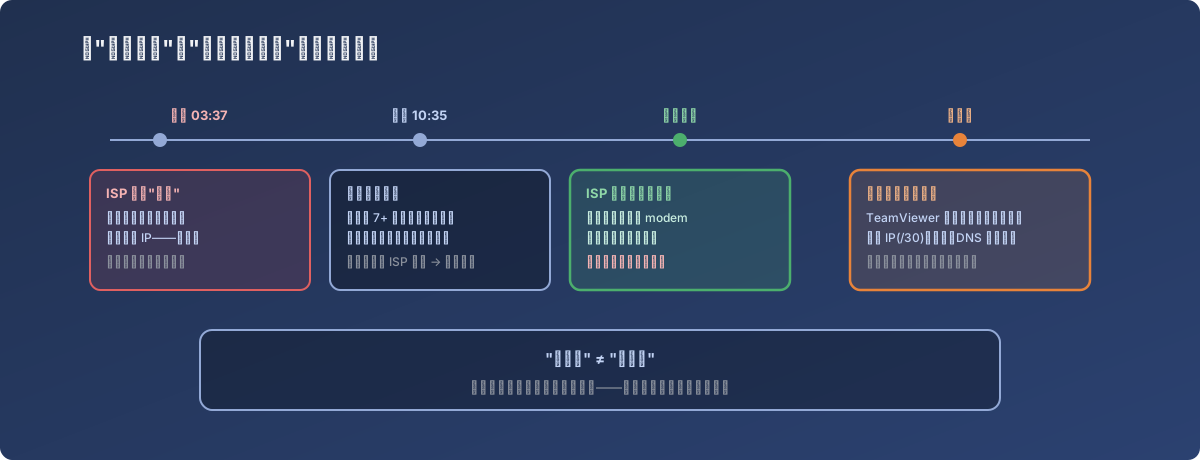
“Fixed” is not “finished” - the incident only closes once the config baseline is re-documented
Lessons
- An ISP’s “maintenance” can absolutely change customer-side configuration (including the public IP) without notice - for static-IP customers that’s practically a guaranteed outage. Contractually, demand advance notice of changes; technically, always keep your own archived copy of the current access parameters;
- Every remote office without local IT needs external availability monitoring - free tools like UptimeRobot provide the outage start/end times that serve both as an internal response trigger and as neutral evidence when confronting the ISP;
- Rehearse the remote-support prerequisites in advance - “how do I remote in when the network is down” (which machine, who turns on the hotspot, which remote tool is installed) should be a standing section in the branch support runbook, not something invented mid-incident;
- After any third-party fix, copy the configuration down yourself - the visiting technician owes you no documentation. “It’s fixed” and “I know how it’s configured now” are two different things, and only the latter is a usable starting point for the next incident.