

Inheriting a Plesk + FTP static website: a complete mental model for non-developers

One of the group’s corporate sites (pure static HTML, hosted on a Plesk-managed web host) was being handed over to a colleague without a development background. Halfway through writing the handover doc it became obvious: what was missing wasn’t steps — it was a mental model. What each piece is, why it exists, where to look when something breaks.
A static site is a printed brochure
The site is static HTML — plain files (HTML/CSS/images/JS) stored on a server and sent to visitors exactly as they are. No database, no backend — fundamentally different from WordPress-style dynamic sites that generate each page on the fly.
The best analogy: a printed brochure. The file you upload is the brochure. A visitor gets handed a copy. To change something, you reprint (edit the file) and swap the old copy on the shelf (upload over it).
Static is precisely why the handover is safe: fast (no processing), simple (any web server), debuggable (what you see is what’s deployed).
From edit to live: the whole chain
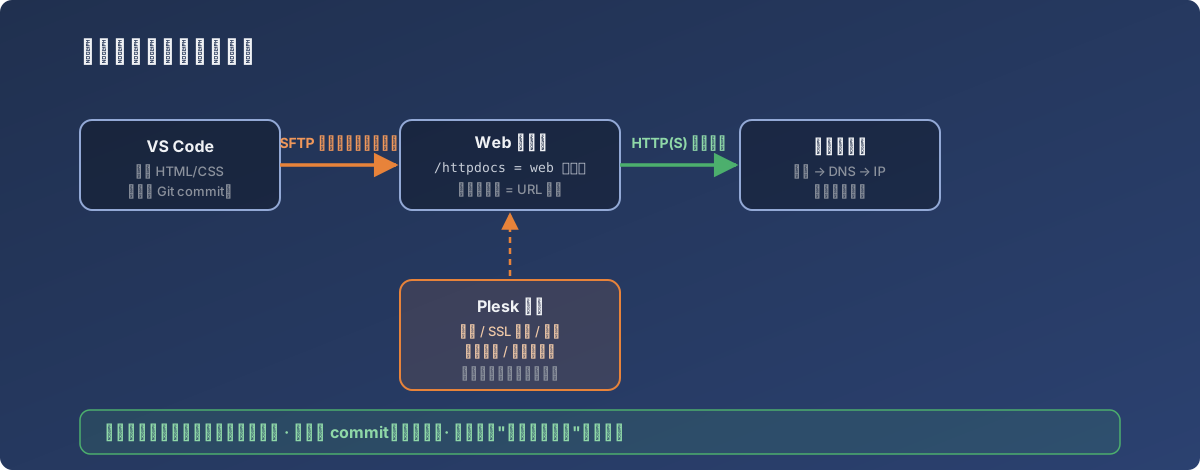
The full map — daily work travels the left path; Plesk on the right is the master panel
- VS Code: where you edit HTML, with an SFTP extension installed;
- SFTP (encrypted FTP): on save, the extension copies the file to the server’s
/httpdocsfolder; /httpdocs= the web root: the folder the server serves. Dropabout.htmlin and it’s instantlyyour-domain/about.html— folder structure is URL structure;- Git/GitHub: version history for every change — the roll-back safety net, the most important thing a non-developer maintainer has;
- Domain → IP: the domain is a human-friendly alias for the server’s IP; DNS does the translation.
Plesk: the master panel you rarely open
Day-to-day editing never touches Plesk. But these situations do:
| Situation | Where in Plesk |
|---|---|
| Create/manage company mailboxes | |
| Renew the SSL certificate (the padlock) | SSL Certificates |
| Site broken, need logs | Error Logs |
| Deleted a file, need it back | Backups |
| Quick edit without VS Code | File Manager |
The three sentences that matter most in the handover
- Whatever you upload is what visitors see — a save away from publishing, so look twice;
- Commit before you change: Git history is your undo button — the whole site can go back to yesterday;
- If the site breaks, don’t panic: static sites almost never break by themselves. First ask “what did I just upload,” then check the logs in Plesk.
Lesson
A handover document’s quality isn’t in how detailed the steps are — it’s in whether the person ends up with a map in their head. Steps go stale; maps don’t.