

Zero-trust for email attachments: everything goes through the sandbox, originals on request
Email attachments are the number-one malware entry point — macro documents, fake PDFs, nested zips, password-protected archives (password in the mail body: engines can’t open them, humans obligingly do). We enabled attachment zero-trust mode on the email security gateway; the design is worth writing down.
The new attachment experience
Once enabled, users no longer see original attachments:
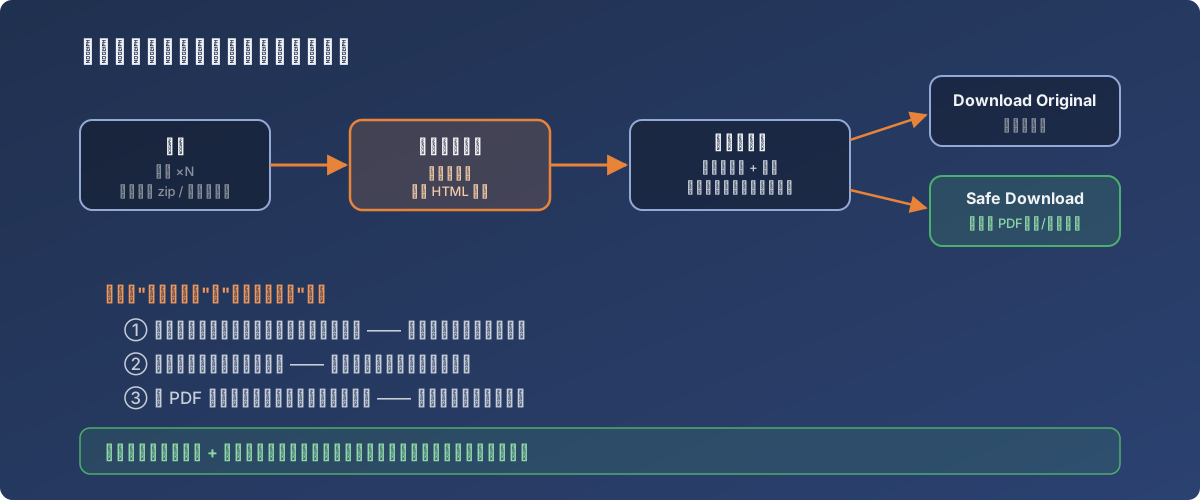
An attachment’s new journey: confiscated first, verified at view time
- However many attachments a mail carried, they’re replaced by one HTML file;
- Opening that HTML in a browser shows the attachment list — view one or all;
- Clicking an attachment triggers a fresh scan by the gateway’s dual antivirus engines + sandbox, including password-protected and multi-layer zip files (exactly the blind spot of traditional scan-once-at-delivery);
- Then two choices:
- Download Original — the untouched file;
- Safe Download (PDF) — whatever it was (Excel, Word, anything), it downloads converted to PDF — macros, scripts and external links all dead. Content intact, risk gone.
Why this design is good
- The scan moves from delivery time to open time: at delivery the engines may not know a fresh sample; hours later at open time the signatures have caught up — the time gap becomes the defender’s ally;
- Password-protected archives lose their free pass: the sandbox handles them in a context where the user supplies the password;
- PDF conversion is an underrated killer feature: most attachments only need to be read — as PDFs, even “accidentally enable macros” ceases to exist.
Costs and countermeasures
Every security tightening has friction:
- User education first: the day attachments become HTML files, tickets spike (“my attachment won’t open!”). An advance announcement plus a one-page illustrated guide deflects 80% of them;
- Keep the exception list disciplined: high-frequency trusted sources (finance statements, EDI files) can be whitelisted — but every entry is a hole in the surface; require an approval trail;
- Watch bulk-download workflows: a business that receives dozens of attachments per mail (customs documents, say) will hate per-file confirmation — align expectations beforehand.
Lessons
- Attachment security was never about scanning harder — it’s about when and with what context you scan. Open-time rescan + sandbox beats ten delivery-time passes;
- “Convert to PDF” is really decoupling “open the file” from “execute the file” — most scenarios only need the former;
- Shipping a security feature = 20% technical configuration + 80% user communication.