

A routine glance at the domain list turned up a domain nobody remembered adding

During a routine check of the cloud admin center’s domain list, an unusual entry turned up: the domain itself was a long string that looked auto-generated, appended with an unfamiliar third-party suffix, showing a status of “Incomplete setup.” Nobody on the team could recall ever adding this domain, or what it might be for.
Facing something unrecognized, don’t rush to delete it
The instinctive reaction to an unrecognized domain entry might be “if nobody recognizes it, just delete it” - but before actually removing anything, the safer move is to first figure out how this record got there in the first place. Deleting a domain some business process might still depend on could cause far more trouble than simply leaving an unrecognized entry alone a bit longer.
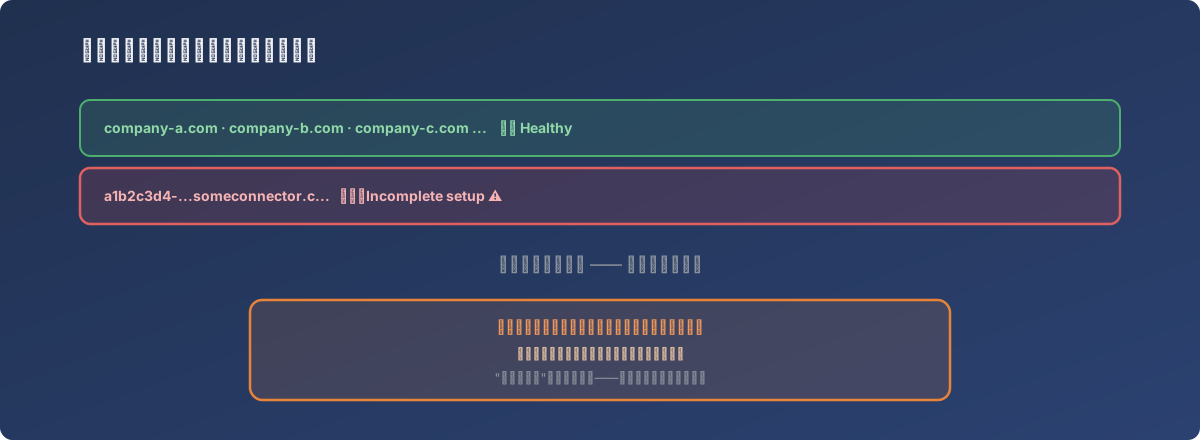
“Incomplete setup” is itself a clue: it never actually took effect, but it was never cleaned up either
Tracing its origin through the domain suffix
The suffix on this domain record was traceable on its own - a search confirmed it belonged to a third-party cloud service connector tool, which auto-generates this kind of placeholder domain when establishing cross-platform integrations, typically used temporarily during domain-ownership verification and connection setup. In other words, this record was most likely created automatically during a prior evaluation or trial of some third-party integration tool, and the corresponding verification or integration process was never completed - neither the tool nor whoever tried it went back to clean up the leftover record - leaving it stuck at “Incomplete setup” until this routine check finally noticed it.
The fix
After confirming the record genuinely had nothing to do with any business process currently in use, it was safely removed from the domain list. This discovery also became a reminder: when evaluating or trialing any third-party tool that needs to connect to the cloud tenant, if it’s never formally activated, it’s worth building the habit of going back to check for and clean up leftover configuration - rather than assuming “never clicked confirm” is the same as “nothing happened.”
Lessons
- Traces left by third-party tool integrations don’t necessarily disappear on their own once you stop using the tool. Some tools create their own configuration objects (like placeholder domains) in your tenant during the integration process, and if that process is abandoned halfway, these objects are likely to be left behind with nothing proactively flagging them to anyone;
- A configuration item showing “Incomplete” status deserves more attention than one showing “Healthy.” “Incomplete” usually means some action was started and never finished - which could be harmless leftover, or it could be a trace of unauthorized activity (like an attempt to add a domain without authorization). Either way, it’s worth tracing the origin first rather than assuming it’s harmless;
- Periodically browsing key configuration lists (domains, connected apps, admin accounts) with no specific problem in mind is one of the few ways to proactively catch this kind of silent leftover. This class of issue rarely raises its own alarm - only actively looking will reveal that something showed up in the list that shouldn’t be there.