

The day everyone got locked out of SAP B1: create one test database, kill the SLD

An unremarkable Wednesday morning. I was batch-creating test databases for Internal Audit (IA) on SAP Business One (MSSQL environment) — several went fine, then while creating one particular subsidiary’s copy, the entire company lost access to SAP.
Symptoms
- Clients threw an Unhandled Exception: “SAP Business One has encountered a problem and needs to close… refer to note 1989457”;
- A red bar on the login screen:
Failed to get database information from System Landscape Directory; - Not one user — Teams and WhatsApp lit up simultaneously. Everyone, every company database.
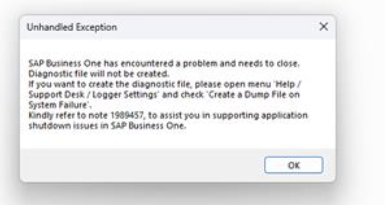
What every user saw at that moment (actual screenshot)
The feeling in that instant: I just created a test database — why is the whole landscape down?
The investigation
- Collect evidence first: asked reporting users for screenshots, confirmed the symptom was uniform (all SLD errors), started the incident report immediately;
- Broadcast: one announcement in the support group — “all users temporarily unable to log in, vendor engaged, updates to follow” — beats replying to everyone individually;
- Vendor call: the vendor remoted in, diagnosed an SLD (System Landscape Directory) failure, and decided to restart SQL Server and the SAP SLD service;
- First snag: SLD took forever to start. The vendor’s explanation: “it took a while for SLD service to start, probably due to the long list of number of DB” — our instance hosts a dozen company databases plus a pile of test ones, and SLD enumerates them all at startup;
- Second snag: during the restart SLD spat out a long Java stack trace, and the vendor said “looks like we need to reinstall the SLD server.” Reinstalling SLD is not a small job — but by then we had already deleted the offending test database. The vendor retried, SLD came up clean. No reinstall needed.
Roughly 40 minutes end to end; users were back in.
Root cause (and an uncomfortable conclusion)
Two questions for the vendor:
Have other customers seen this? — “never seen before.”
Will it recur? — suggestion: try creating another test database and see.
Under vendor guidance we later recreated the test database with a different name. Everything worked; the failure never reproduced. So the final verdict is only this: the database creation disturbed the SLD service at some moment — the exact mechanism, even the vendor can’t say. A lot of production incidents end in exactly this “not fully explainable” state.
Lessons
- SLD is SAP B1’s single point of failure. When it dies, it’s not one database going dark — it’s every database, every user. Carry that awareness into any operation that could touch it;
- Creating a database on a production SQL instance is not a zero-risk operation. Even a test one. These now go strictly into out-of-office hours;
- Reinstalling is the last resort. When the vendor said “reinstall SLD”, the right question was “what changed just now?” — rolling back the suspicious change (deleting the offending test DB) saved us a reinstall;
- Keep comms templates ready: one group announcement during the flood, one closing explanation after recovery (“a test database creation unexpectedly interrupted the SAP service; restored; investigating root cause with the vendor”) kept the situation calm;
- SLD startup time scales with database count — clean up your test databases, or they’ll slow down your next recovery.