

iVMS said 'applied to device', but the back door didn't know these people: a front-to-back door sync that silently skipped users

The branch office originally had a Hikvision access terminal on the front door only; a second terminal later went in on the back door. The task sounded like pure freight: sync the dozen-plus people already enrolled on the front-door device - faces, fingerprints, card numbers - onto the back-door device, so everyone can use both doors.
The tool was iVMS-4200: collect the people from the front-door device into the software (Get from Device), build the back door’s Access Group, then push the changes to the back-door device (Apply Changes to Device). The flow completed with green lights all the way.
Then the skipping started.
Leak one: Get from Device doesn’t collect everyone
Even the step of collecting people from the front-door device into the software wasn’t a full success - of the dozen-plus people, most came in fine, and a couple simply didn’t. No error, no failure list - the roster was just quietly short.
More confusing still, the views disagreed: looking directly at the device’s own user list, a given person is clearly there; in the software portal, they aren’t - and the reverse case existed too. Between the front-door device and the iVMS database sits a difference set that nothing ever tells you about.
Leak two: Apply to Device doesn’t land everyone either
Before pushing people and the authorization group to the back-door device, one deliberate step: log into the back-door device itself and screenshot its current user list - that comparison baseline later saved the day.
The push executed; the UI reported the application complete. Logging back into the back-door device to verify: two people short. They were plainly ticked in the software-side authorization list; on the device they simply hadn’t landed - again with no error anywhere.
Closing out: manual enrollment plus line-by-line comparison
For those two stragglers, the software sync got abandoned in favor of manual enrollment directly on the back-door device - create the user on-device, bind the card, test the door on the spot, done. One further user refused to appear no matter how the software pushed; that went on record, with “reinstall the iVMS client and retry” as the standby plan (when this older client’s local database goes inconsistent, reinstalling tends to beat repairing).
Final acceptance wasn’t the software’s “applied successfully” - it was logging into both devices and comparing their user lists against the original screenshot baseline, line by line. Only when both doors’ rosters matched did the task close.
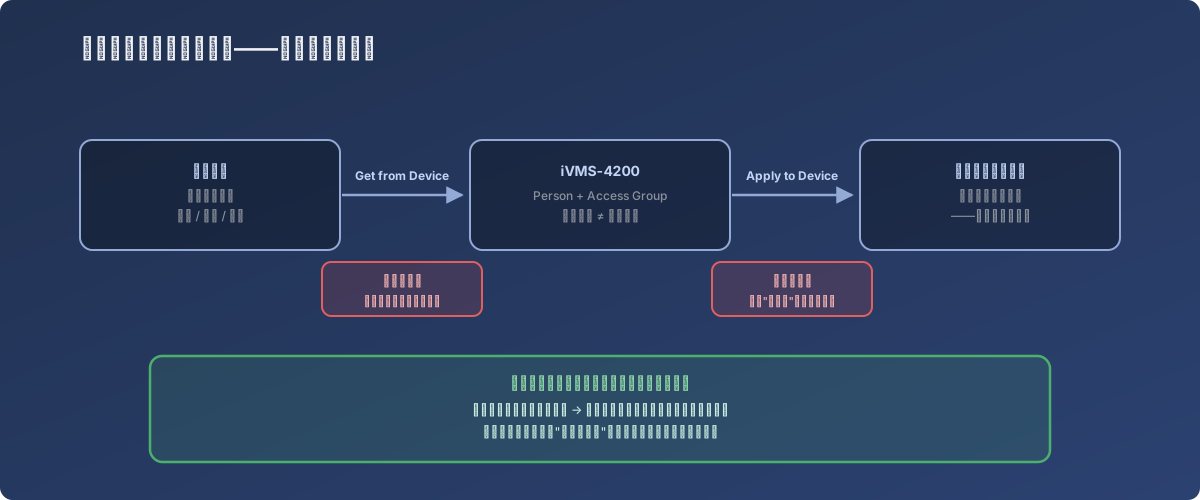
The acceptance criterion for any sync operation lives at the target end - never in the initiator’s success message
Lessons
- Sync in access-control management software of this class is best-effort, not transactional - no failure list, no rollback; partial success and full success look identical in the UI, so you count heads yourself;
- Baseline the target device before operating (screenshot or export) - without a baseline you can’t even say who went missing afterwards;
- Acceptance happens on the device - log into the target and read the real roster; the software portal’s view and the device’s local data can disagree indefinitely;
- For the odd stubborn user, manual on-device enrollment is a perfectly respectable fallback - at a dozen-person scale, wrestling the sync mechanism for the last one or two people loses to two minutes of hand enrollment; log the anomaly and save the big guns like “reinstall the client” for when things break in bulk.