

Guest WiFi couldn't get online. Every configuration checked out fine - a physical unplug fixed it

One wireless setup ran two SSIDs: the default network staff used daily, and a separate guest network for visitors. One day, guest network users started reporting no internet access, while the staff network kept working the entire time. This “same hardware, only one network is broken” situation comes with a built-in point of comparison: the network that still works is the best possible baseline.
Symptom: a textbook DHCP failure
Client devices on the guest network showed an APIPA self-assigned address (169.254.x.x) in ipconfig /all, with no default gateway - Windows’ fallback behavior when it never gets a response from a DHCP server. In effect, it’s a clear signal: the DHCP request went out, but nothing answered.
Investigation: checking access points, controller, and firewall layer by layer
- Baseline test: running
ipconfig /allon the working default network confirmed it got a valid address in its subnet - ruling out a total network infrastructure failure and narrowing the problem to the guest network’s specific path; - Checking access points: logging into the wireless controller showed every relevant AP online, none dropped or unreachable - ruling out AP failure;
- Checking client connection status: the controller showed multiple guest-network clients flagged with poor signal/no connectivity, consistent with failed DHCP assignment - but this only confirmed the symptom further, it wasn’t the root cause;
- Checking SSID configuration: both SSIDs’ settings (network type, AP bindings) in the wireless controller were correct - ruling out an SSID-level misconfiguration and shifting focus to the DHCP service on the firewall;
- Checking the firewall’s DHCP server configuration: the guest network’s VLAN interface and DHCP server settings (address pool range, subnet mask, gateway, lease time) were checked item by item - all correct, and the address pool wasn’t exhausted either.
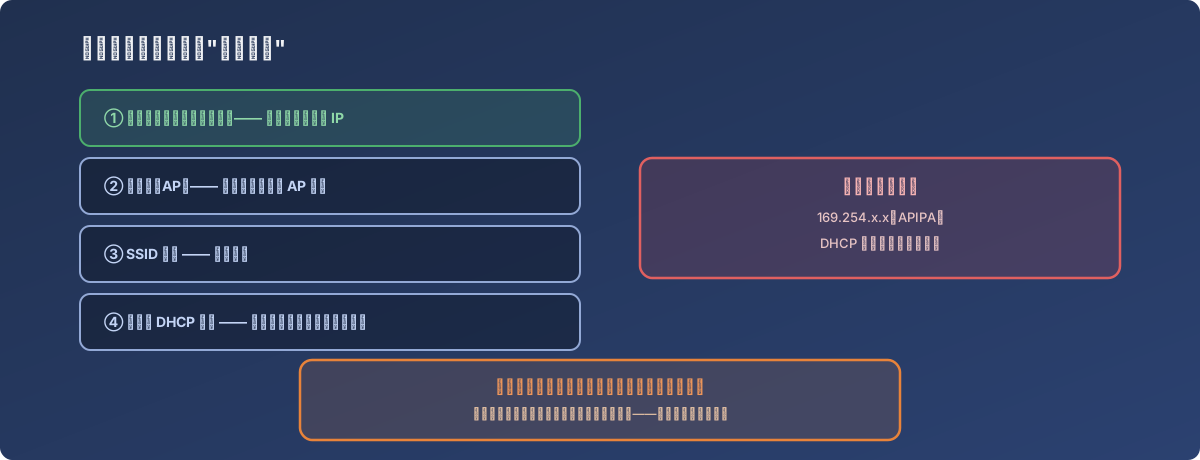
Everything checked out “correct” at the configuration level, and the network still didn’t work - that itself is a finding
The turn: a reboot didn’t fix it, a physical unplug did
With nothing found at the configuration level, a remote firewall reboot was tried first - the symptom persisted afterward, ruling out the kind of transient state issue a reboot alone would clear. A technician went on-site the next day and physically touched the firewall and switch: plugging into the switch port couldn’t reach the relevant VLAN, so they connected directly to the firewall and opened the DHCP monitor page - at which point IP lease assignment started working normally right after this round of plugging and unplugging. In hindsight, the working theory is that some physical connection (a switch port or firewall port) needed to be physically re-triggered (unplugged and replugged) to “wake up” into normal operation - exactly which physical-layer component was at fault couldn’t be confirmed after the fact, but the unplug/replug itself did resolve it.
Lessons
- Troubleshooting with a baseline for comparison is far faster than troubleshooting blind. The premise here - identical hardware, one SSID working and one not - immediately narrowed the suspect list from “the entire network” to “whatever’s specific to this one SSID’s configuration,” cutting the investigation path down significantly;
- Verifying “configuration is correct” layer by layer can still turn up no root cause. APs, SSID settings, and DHCP server configuration all checked out clean, which suggests the problem wasn’t at the configuration layer at all, but somewhere deeper in the physical connection or hardware state - the kind of thing pure software-side troubleshooting can’t surface;
- Not every failure has a root cause that can be cleanly explained. The fix here was “unplug and replug the cable,” not “changed a specific setting.” When configuration-level troubleshooting turns up nothing but a physical-layer action genuinely resolves the issue, recording what was done to fix it is more useful than insisting on a perfect explanation for why.