

Guest SSID clients stuck on APIPA: every layer checks out, then a cable-plug fixes it

A branch office’s guest Wi-Fi (its own SSID on a dedicated VLAN) dropped for everyone one afternoon. The root-cause line in the final incident report is the kind no engineer enjoys writing.
Symptoms
- Every client on the guest SSID got an APIPA self-assigned address (169.254.x.x) with no gateway — DHCP completely unresponsive;
- Pings from that segment to the VLAN gateway (192.168.61.254) timed out;
- The other SSID on the very same APs (default network, 192.168.1.x) worked perfectly throughout;
- The UniFi controller showed guest-SSID clients in a sea of orange “poor experience / no connectivity”.
The ipconfig /all contrast was surgical: a client on the healthy SSID held 192.168.1.63; a client on the broken SSID showed Autoconfiguration IPv4 Address 169.254.242.41 — pinning the fault precisely to one VLAN’s DHCP path.
Layer-by-layer investigation (every layer is fine)
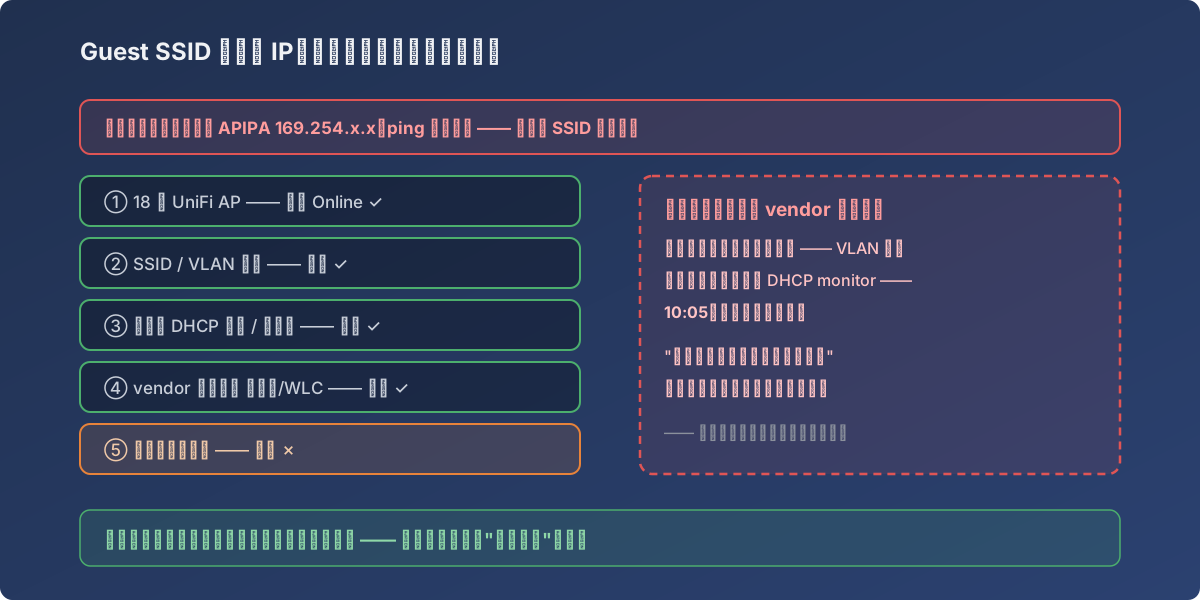
Every layer of the investigation came back green — which is exactly what made this one maddening
- AP layer: all 18 UniFi APs Online — not an AP failure;
- SSID/VLAN config: both SSIDs intact, guest correctly bound to VLAN 20;
- DHCP server (firewall): pool 192.168.61.20–240, 24 h lease, gateway and DNS correct, pool nowhere near exhausted;
- Vendor remote review: VLAN, firewall, switch, WLC each re-verified — “all are correct”;
- Late-night firewall reboot: no change.
Config layers all green, reboot useless. What’s left?
The ending: physical-layer voodoo
The vendor engineer came onsite the next morning:
- Plugged a laptop into the switch — couldn’t reach the VLAN;
- Plugged into the firewall and opened the DHCP monitor — at 10:05, leases suddenly started flowing, clients picked up addresses, everything recovered.
The report’s own words: “some physical connections either plug to switch or firewall awake them to function.” Exact mechanism? Unknown. Perhaps a wedged port negotiation, perhaps a stale forwarding table on one device — the physical re-plug forced a renegotiation. Problem solved; the root-cause field honestly reads “could not be fully determined.”
Lessons
- Investigate by layer and trust each cleared layer: AP → SSID → VLAN → DHCP → physical. Once a layer is verified, stop re-suspecting it, or you’ll circle the configs until dawn;
- A control group is the sharpest tool: the healthy SSID on the same APs eliminated the entire wireless side instantly, halving the search space;
- When reboots stop working, go physical: swap ports, swap cables, re-plug to force renegotiation — there’s rarely anything stranger left;
- Write unresolved-root-cause incidents into a formal report anyway (timeline + step log + a quick recheck list). Next recurrence starts at step ⑤ instead of step ①.