

A firewall's expired certificate made its 'security filtering' take down the whole office's internet

Every user at a site suddenly lost internet access at the same time, with WiFi status reading “No internet, secured” - the cabling and WiFi signal itself were fine, but no webpage would load. This “network looks connected but nothing works” symptom naturally points first at DNS or an ISP outage. This time, though, the root cause sat somewhere easy to overlook: the firewall’s security-subscription license had expired.
Investigation: rule out the wiring first, then look at the security features
- Logging into the firewall’s admin interface remotely via its public IP confirmed the WAN link and ISP service were both online and stable - connectivity itself wasn’t the problem;
- Further analysis showed traffic was being blocked because the firewall’s active security modules (Web Filter, DNS Filter) couldn’t reach the vendor’s rating-verification servers to classify websites - and the direct consequence of a failed verification was: block by default, rather than allow by default.
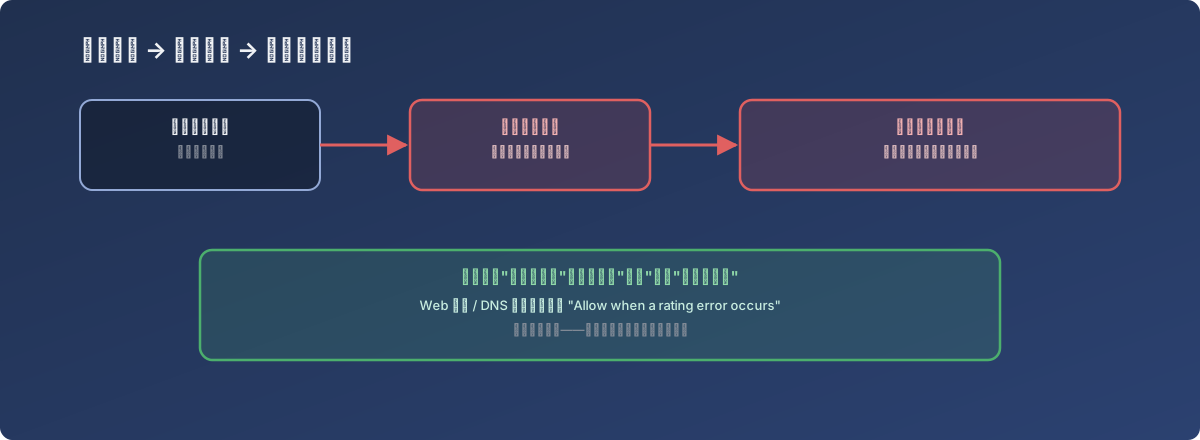
An expired subscription license doesn’t raise its own alarm - the first alarm is “the whole office is offline”
Root cause: the expired license was just the trigger - “block on verification failure” was what actually detonated it
Security subscriptions (antivirus, intrusion prevention, Web/DNS filtering) rely on the firewall periodically checking in with the vendor’s servers to verify license validity. Once this license expired, the Web Filter and DNS Filter modules couldn’t reach their verification servers, which triggered a conservative default policy: block any traffic that can’t complete rating verification. The intent is protective - avoid passing potentially malicious traffic while verification is broken - but the cost is that the moment the license lapses, nearly all legitimate business traffic gets blocked right along with it.
The fix
- Isolate to confirm: temporarily removed the security modules from the main outbound policy, which restored connectivity immediately - confirming the problem really was the security modules, not something else;
- Proper fix: re-added the security modules to the policy, and in both the Web Filter and DNS Filter configuration, changed the “behavior on rating verification failure” from the default “block” to “allow when a rating error occurs”;
- The remaining follow-up is renewing the expired security subscription itself so rating verification actually starts working again - step 2 only prevents a similar situation from taking the whole site offline again; it’s not a substitute for renewal.
Lessons
- An expired subscription license doesn’t raise its own alarm - it shows up disguised as a network outage. Many security subscriptions have no strong pre-expiry reminder mechanism; the first sign a license has lapsed is often the business impact it’s already caused;
- “Block or allow on verification failure” is a choice that should be made deliberately, not left to whatever the vendor defaults to. Blocking by default is safer, but the cost is that any failure in the security component turns directly into a site-wide outage. Configure this behavior explicitly based on how the business actually weighs availability against security, rather than letting the default decide;
- When troubleshooting “the network looks fine but nothing connects,” don’t overlook the firewall’s own security modules as a possible source of failure. It’s easy to focus entirely on cabling, DNS, and the ISP while missing a dependency as easy to forget as a security subscription license.