

A cloud ERP's 'self-service refresh' button quietly breaks when multi-site replication isn't cleaned up on both ends

Cloud ERP (SaaS) platforms typically offer a “Self-Service Refresh” feature, letting a customer pull a snapshot of production (PRD) data into their test/training environment (TRN) without opening a ticket and waiting on the vendor. After replicating two new sites’ data into the test environment this time, the test environment’s site dropdown suddenly stopped showing the existing sites, and the self-service refresh feature itself started failing repeatedly.
Layer one: the self-service flow fails, with no visible cause
The initial symptom was surface-level: after running self-refresh, both business instances (call them Instance A and Instance B) vanished from the test environment’s dropdown - unselectable, and resubmitting the refresh request just returned an “invalid configuration name” error. Retrying, waiting, retrying again - same result every time. This class of “the self-service feature itself is erroring” problem can’t be root-caused from the customer side of the UI; it has to escalate to the vendor’s support team.
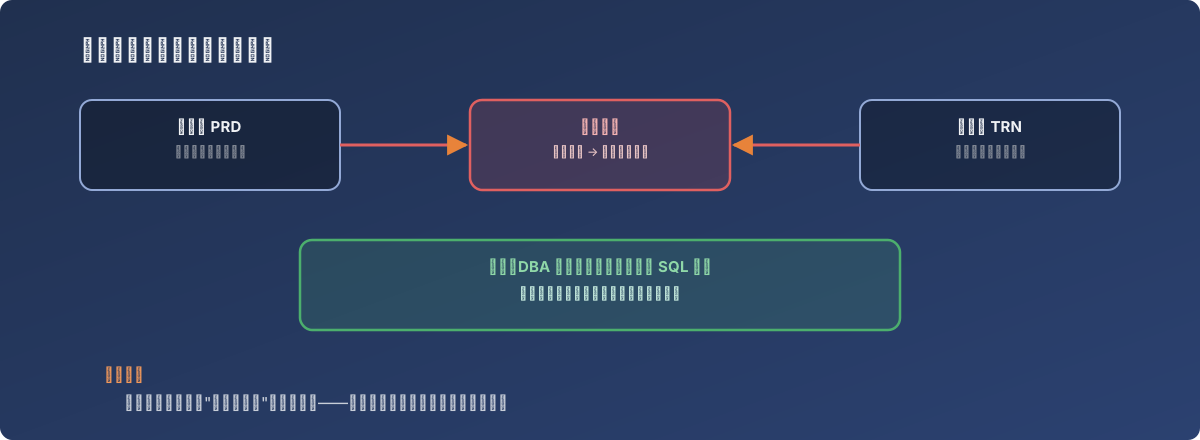
“Self-service” saves you the ticket-routing time - it doesn’t mean a backend data-structure problem can self-service its way out
The actual root cause: the new sites’ replication records weren’t cleaned up on either end
The vendor’s support team, after investigating, concluded: before replicating site data into the test environment, a SQL cleanup script needs to run on both the production and test databases, fully clearing out the replication configuration records for whichever site is being removed or replaced. Skip that step, and the leftover replication records collide with the new replication request - causing the self-refresh feature to find no valid configuration at execution time, and simply drop both instances from the dropdown entirely, rather than surfacing a more legible “conflict” error.
In other words: the self-refresh feature was never designed to handle the in-between state of “multi-site replication configuration currently being changed.” It assumes a clean, stable site structure - and if a site gets added or removed during the self-refresh window, the feature fails in a way that gives no direct clue as to why.
The fix
The vendor’s DBA team ran the corresponding site-cleanup SQL scripts against both the production and test databases, fully removing the old sites’ replication records. Resubmitting the site replication / self-refresh request afterward restored the test environment’s dropdown and refresh functionality.
Lessons
- “Self-service” saves process time, not diagnostic time. When a self-service feature itself starts erroring - especially alongside something counter-intuitive like “configuration options vanishing” - it usually means the backend data structure has landed in an in-between state the self-service flow was never built to handle. At that point, retrying is pointless; escalate to someone who can look at the database directly;
- Structural changes to a multi-site/multi-tenant system (adding or removing sites) are best kept out of the same window as automated operations like self-refresh. Running both at once creates an in-between state that easily breaks the automation’s assumptions, and the resulting failure often looks completely unrelated to its actual cause (leftover replication records);
- When a feature suddenly breaks broadly with nobody having touched its configuration, suspect the most recent structural change first - even one that looks unrelated to the current error - before assuming the software itself has a bug. Here, two seemingly independent actions (adding site replication, self-refresh erroring) turned out to share a single root cause.