

Bought an 8TB drive to export CCTV footage. The DVR only ever saw 2TB of it

Exporting a batch of recorded footage off a DVR meant getting the data onto a portable drive. For that, an 8TB Samsung portable SSD seemed like the obvious choice - bigger capacity should mean less hassle. Instead, plugging it into the DVR produced a string of errors: first “disk not recognized, cannot select,” then, on a second DVR, “partition not supported.” Several rounds of reformatting later, the actual issue turned out to have nothing to do with formatting technique - this class of DVR was never designed to address more than 2TB on a single disk, period.
The troubleshooting loop: reformat, try again, still confused
- On DVR1, the 8TB SSD triggered “disk not recognized, cannot select”;
- The same drive on DVR2 produced “partition not supported” instead;
- The disk was exFAT by default. Converting it to an MBR partition table ran into another wall: under Windows 11, the only file systems on offer for that conversion were exFAT and NTFS - neither of which the DVR accepted, forcing a detour through third-party partitioning tools;
- Once converted to MBR, a different limit appeared: the MBR partition scheme itself can only address up to 2TB per disk, no matter how large the physical drive is - an 8TB drive under MBR still only exposes 2TB;
- Switching to GPT (which can fully address all 8TB) hit the opposite wall: the DVR simply doesn’t support GPT at all, landing right back at the original “disk not recognized” error.
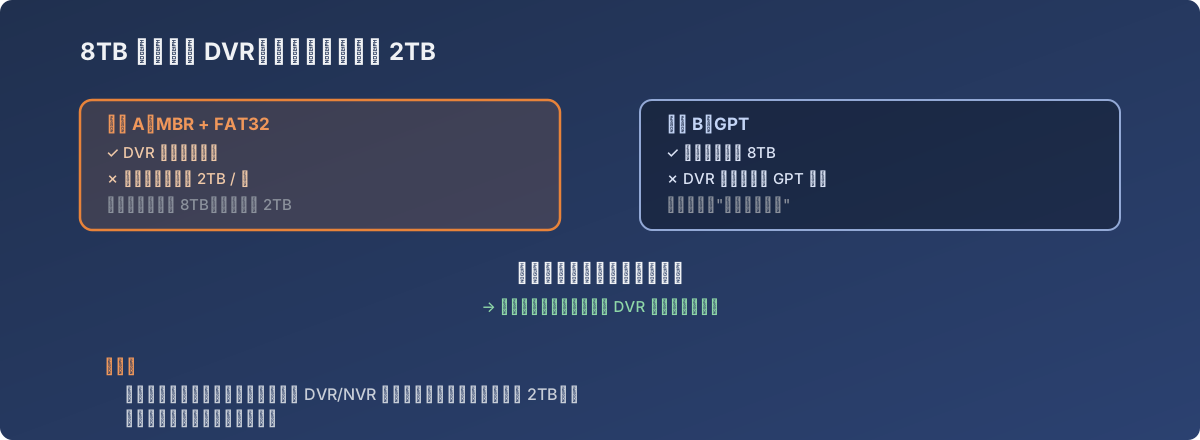
Both paths are individually correct - they just never meet
The actual root cause: not a formatting mistake, a hard device limitation
Once both sets of rules were mapped out, the conclusion was blunt: this DVR’s firmware only supports MBR partition tables plus FAT32, and MBR’s spec ceiling is 2TB. In other words, whether the attached drive is 8TB or 16TB, on this class of DVR the usable space always tops out at 2TB - this isn’t a misconfiguration with a “correct setting” waiting to be found; it’s a limitation baked in at the product design stage, and no formatting sequence works around it.
What actually got done about it
- Plan storage purchases for CCTV export in 2TB units, rather than buying one large drive on the assumption it’ll swallow everything in a single export;
- When the footage to export exceeds 2TB, split it across multiple exports or multiple 2TB-class drives, instead of hunting for a way to make the DVR recognize a larger partition;
- Before buying storage hardware for a surveillance system, check the DVR/NVR model’s officially supported partition scheme and file system first - capacity planning has to start from the device’s spec sheet, not the drive’s advertised size.
Lessons
- “Bigger capacity is always better” doesn’t hold on embedded devices. DVRs and NVRs often have their storage subsystem locked to an old partitioning standard (MBR) - plan capacity around the device’s spec sheet, not the drive’s label;
- When troubleshooting a “nothing I format it as works” problem, map out both sides’ constraints (disk limitation vs. device limitation) and check whether they actually overlap - here, MBR and GPT each solved half the requirement, but the overlap between them was empty, which is the tell that the problem is the device itself, not the formatting steps;
- Before spending money on a large drive, verify compatibility cheaply first - it’s far less costly than discovering the incompatibility after the 8TB drive is already sitting on your desk.