

The fingerprint enrollment scanner died. Swapped in a newer model from the same product line - enrollment worked, the door still didn't

A door access system had long used a fingerprint scanner to enroll new employees, with an identical backup unit kept as a spare. When the backup finally died for good, a newer model from the same product family was bought to replace it. Enrollment with the new scanner went through without a hitch - the software recognized it fine, and the enrolled fingerprint data confirmed successfully syncing (pushed) to the corresponding door reader. But when the new employee tested it at the door, the fingerprint simply would not authenticate, no matter how many times they tried.
Every step, looked at individually, says “success”
What makes this class of problem so frustrating to troubleshoot is that every individual step reports success:
- The new scanner connects fine, and the software confirms the enrollment succeeded;
- The system confirms the fingerprint data synced/pushed to the target door device with no error;
- The door device itself confirms it received the new user record.
Looking only at these green “success” indicators, there’s no visibly broken step. The actual problem lies in an assumption implicit behind all these “successes”: that the fingerprint template produced by the enrollment device and the template format expected by the door reader are fully compatible.
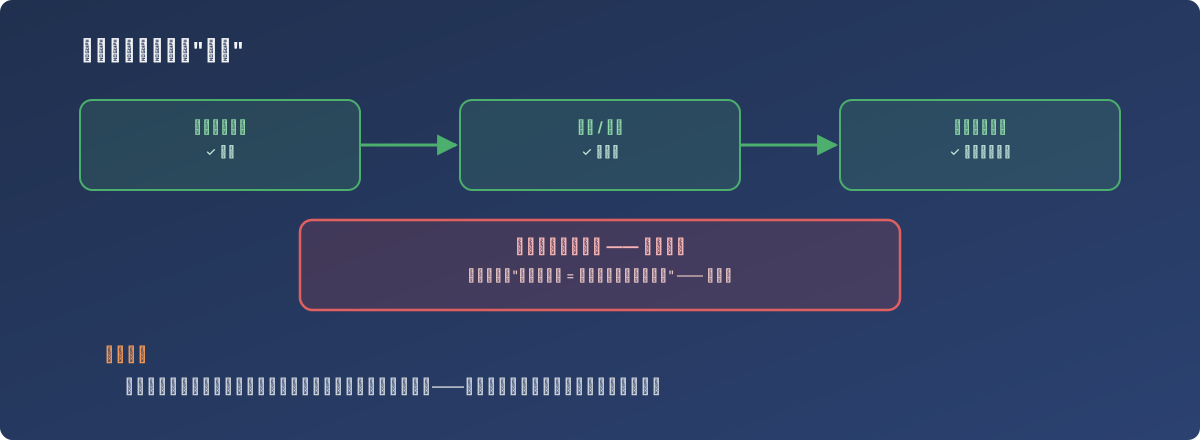
The process completed end to end - that doesn’t mean both ends were speaking the same format
The problem hides in the phrase “same product family”
Two generations of hardware from the same vendor and product line sound like they should be fully backward-compatible, but biometric devices’ fingerprint template algorithms can change between generations. If the template data structure the new scanner produces during enrollment doesn’t exactly match the template version the door reader expects, the door device can fail to authenticate that fingerprint indefinitely during actual comparison - even though the data itself was transmitted and written successfully. This class of problem never throws an error during transmission/sync, because the transmission itself isn’t broken - what’s wrong is that the two ends disagree on how to interpret the data.
The response
Contact the device vendor’s technical support to confirm whether fingerprint templates are fully compatible between the old and new scanner generations, or whether some conversion or firmware adaptation is required. Until the vendor gives explicit compatibility confirmation, the cautious approach is to choose the enrollment device based on the door reader’s specification, rather than assuming “same product family” means “compatible.”
Lessons
- Every step in a process reporting success doesn’t mean the process’s final output is correct. Each step typically only verifies “did this specific operation itself fail” - not “does the previous step’s output actually satisfy the format the next step genuinely needs.” This kind of implicit cross-step assumption is exactly what’s easiest to overlook;
- Systems involving proprietary data-format versions - biometrics, encryption algorithms - can’t be assumed backward-compatible across generations just because they’re related. Swapping in a newer generic peripheral usually causes no compatibility issue, but when proprietary algorithm-generated data formats are involved, “same product family” doesn’t mean “same format”;
- When facing “every step succeeds, but the end result is wrong,” redirect the investigation toward whether the data passed between two adjacent steps is actually in the same format - not toward finding an error inside any single step. The problem here wasn’t inside any one step; it was in the assumption gap between two of them.