

A barcode printer's error log grew to 30GB - the root cause wasn't disk space, it was a free-edition database hitting its ceiling

The SQL Server behind Bartender (barcode label printing software) had its error log file (ERRORLOG) balloon to 30GB without anyone particularly noticing. The immediate reaction on discovery was damage control: move the existing log file elsewhere to free up disk space, let the system generate a fresh error log, and bring in the software vendor’s support team to find the root cause - specifically wanting to know whether some recent change had triggered the symptom.
The root cause wasn’t disk - it was a database that was already “full”
After reviewing the log contents, the vendor’s support team delivered a blunt diagnosis: the database behind this system (Datastore) had already hit the capacity ceiling that SQL Server Express edition enforces. Two error types kept repeating in the log:
Error: 1827- “CREATE DATABASE or ALTER DATABASE failed because the resulting cumulative database size would exceed your licensed limit of 10240 MB per database”;Error: 1101- “Could not allocate a new page for database ‘Datastore’ because of insufficient disk space in filegroup”.
The Express edition enforces a hard 10GB ceiling per database, while the business system (print job logs, message records) kept writing continuously. Once the database engine started rejecting writes, the application layer didn’t stop - it logged every rejected write as a fresh error into SQL Server’s error log. The database itself was firmly stuck at its capacity ceiling, unable to move, but the log file carried no such limit - so it became a quiet, relentless loop: the business keeps trying to write → the database rejects it → one more line in the error log → repeat tens of thousands of times → the log file balloons to 30GB. The 30GB bloat traced back to a database jammed against its 10GB ceiling - it was never a disk-performance or disk-capacity problem.
Fixing it in three steps - treating both the symptom and the cause
Step one, free up space on the database: use SQL Server Management Studio to run a Shrink on the Datastore database, releasing space that had been allocated but never used; at the same time, change the database’s recovery mode to Simple to prevent the transaction log from ballooning further too.
Step two, clean up the historical business data - this is the actual cure: in Bartender’s own Administration Console, under System Database → Administrative Tasks, find Purge Records, manually run one round to clear the backlog of historical print-job records and message logs, then set up a daily automated maintenance schedule so old logged data gets purged (optionally archived) on a rolling basis going forward. One easily-misunderstood detail worth keeping: purging only affects print job logs and messages - the actual files stored in Librarian are untouched. Business data and operational logs live in separate stores, so purging logs never accidentally deletes archived files.
Step three, dedicated SQL accounts were created for ongoing maintenance, specifically for running these shrink/purge operations going forward, rather than reaching for a system administrator account every time.
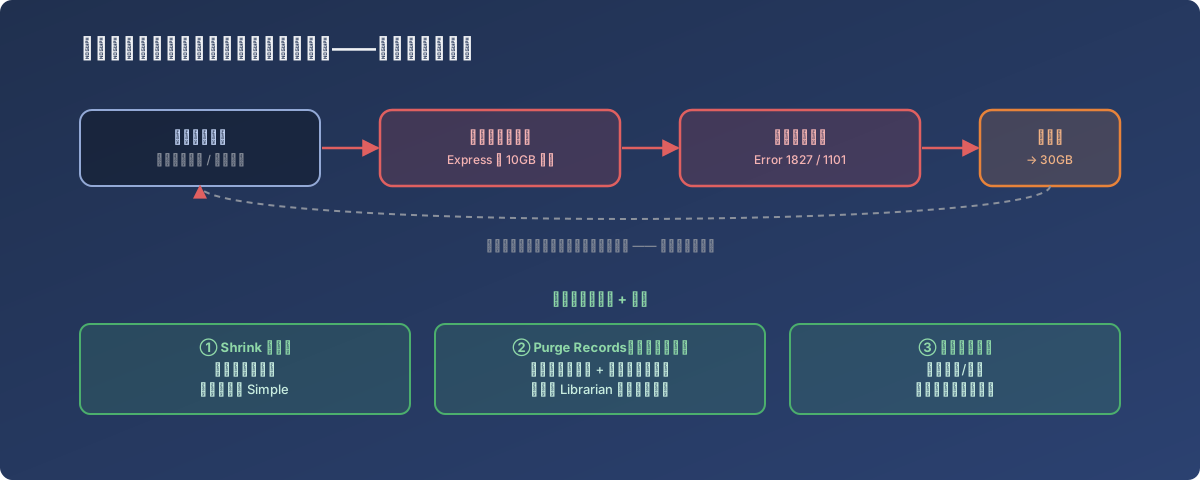
What’s “stuck” is the database; what actually “balloons” is the error log - two symptoms of the same root cause
Lessons
- When a file’s size grows abnormally, don’t just look at the file itself - read what its contents are actually saying. A 30GB error log isn’t “the logging system broken” - it’s the database faithfully recording one thing happening over and over: a write got rejected, and that’s one log line;
- Systems running on SQL Server Express need someone actively tracking its capacity ceiling. The Express edition’s 10GB-per-database line is deliberate design, not a bug - business data volume grows naturally over time, so schedule data cleanup or consider upgrading to a paid edition ahead of hitting the ceiling, rather than reacting after the fact;
- Application-level data cleanup and database-level space reclamation are two separate things, and you need both. Shrinking without cleaning up historical data just means the database hits the ceiling again later; cleaning up historical data without shrinking doesn’t automatically return the already-allocated disk space to the system;
- Upgrade cleanup from “do it manually once” to “schedule it to run automatically.” For logs and job records that accumulate continuously in a business system, a recurring maintenance schedule is far less effort than waiting until the size becomes alarming and then cleaning it up by hand.