

An almost-forgotten cloud admin account was blocking the on-prem directory from syncing

A directory sync service sent a system alert email titled “Sync errors detected,” reporting one error in the data sync between the on-prem directory and the cloud directory. This kind of alert email tends to be worded vaguely - it tells you an error exists, but not which specific account or why. Getting to the bottom of it takes some digging.
Following the error down
Logging into the admin center to check the sync error’s details, the error type pointed to a duplicate attribute conflict - meaning a user object the on-prem directory was trying to sync collided with a key attribute (like the User Principal Name, UPN) already claimed by a different object that existed in the cloud. The sync service couldn’t determine whether the two objects were actually the same person, and simply refused to complete the sync.
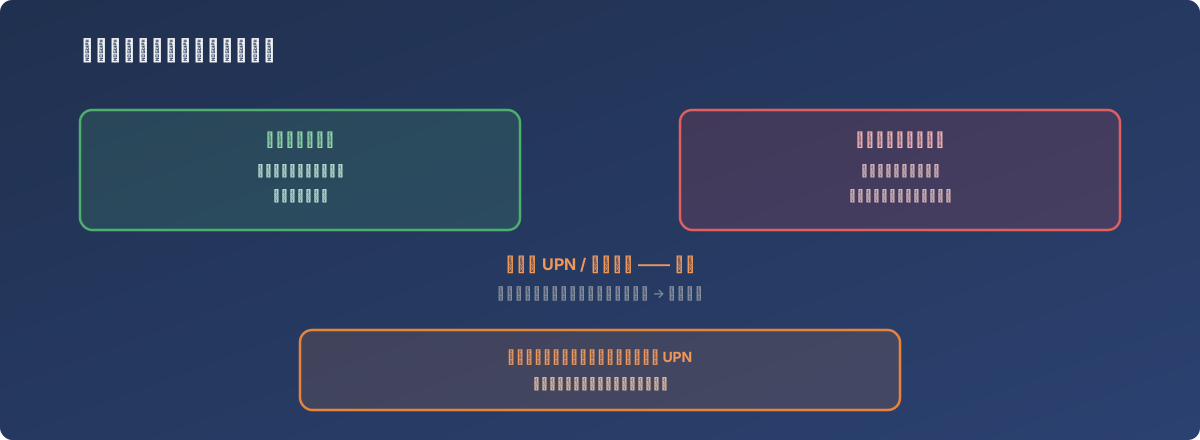
One side of the conflict is a brand-new account waiting to take effect; the other is an old account created long ago that almost nobody remembers
The other side of the conflict was a leftover cloud account
Further checking revealed the cloud-side object colliding with the new on-prem account was a cloud-only administrator account that had never synced with the on-prem directory at all - the kind of account typically created as the initial admin identity when a cloud service first goes live. Once day-to-day administration shifts to using a directory-synced account instead, this early cloud-only account is easy to forget - but it doesn’t disappear on its own, and it still holds onto its own attributes.
When the on-prem directory’s normal sync process later tried to create or match an object using that same attribute, this long-forgotten but still-existing account turned into a roadblock.
The fix
The leftover cloud account’s User Principal Name (UPN) was manually changed to a non-conflicting value, freeing up the attribute it had been occupying. With that done, the corresponding on-prem user object synced successfully without triggering the duplicate attribute conflict again. Before making the change, the cloud account’s current actual usage was confirmed (whether it was still in use and what role it played), to avoid renaming it carelessly and breaking something else that depended on it.
Lessons
- “An account nobody has touched in a long time” doesn’t mean “it can’t affect anything else.” A leftover cloud account, even if nobody signs in with it anymore, can still turn into an unexpected roadblock in some future sync operation as long as it’s still holding onto a key attribute;
- A sync alert email typically only describes what type of error occurred, not who’s on the other side of the conflict. Getting the answer requires logging into the admin center and tracing the specific objects behind the error type - the alert email itself functions more as a “go check this” nudge than a diagnostic report;
- The initial admin account temporarily created when a cloud service first goes live deserves a clear resolution once the regular process stabilizes - either formally converted into a long-term managed account, or properly retired once confirmed unneeded, rather than left to become a “ghost account” that only gets noticed the next time something breaks.