

An RSP upgrade gone wrong: version says PL20, service refuses to start

Upgrading SAP Business One’s RSP (Remote Support Platform) from PL18 to PL20. The installer finished, the version number dutifully read PL20 — and the service wouldn’t start. Service restarts, stop-and-rerun-installer schema attempts — nothing brought it back.
The recovery path: keep the database, keep everything
All of RSP’s configuration, backup history and connection data live in its MSSQL database. As long as the database survives, the software itself is expendable:
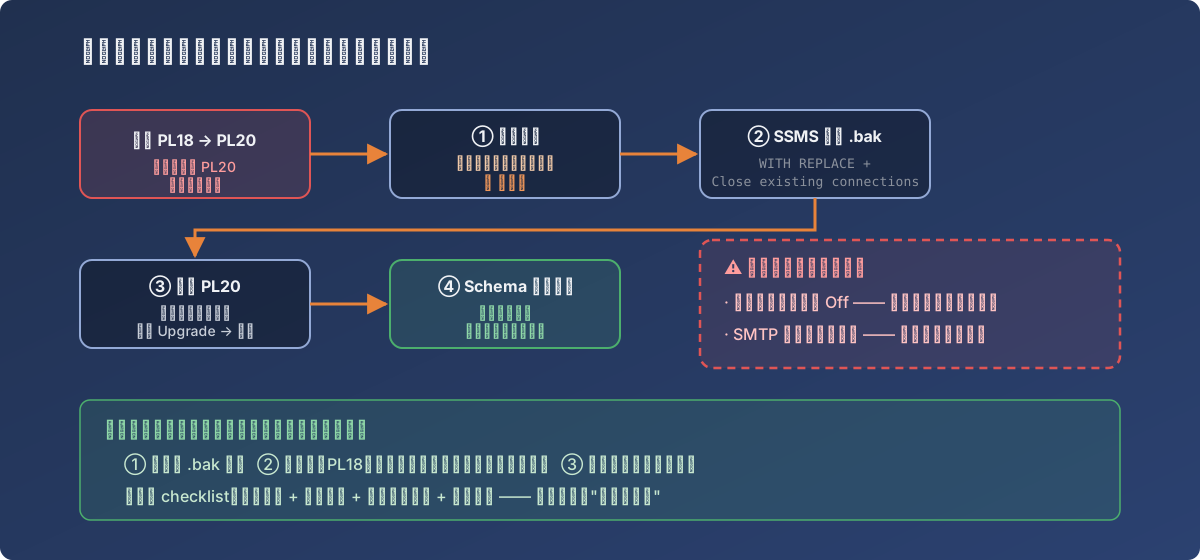
The full recovery path — the dashed box on the right nearly planted the next incident
- Uninstall RSP. The critical moment is inside the uninstaller: it asks whether to delete the database — choose keep. Click wrong here and the recovery difficulty doubles;
- Restore the database backup (.bak) in SSMS: tick Overwrite the existing database (WITH REPLACE) and Close existing connections to destination database, or live connections will block the restore;
- Reinstall PL20 as Administrator, pointing at the database server — the installer detects the existing older-version database and offers Upgrade;
- Accept, let it migrate the schema — the service starts cleanly and all history and configuration return intact.
In parallel we dug out the PL18 installer as Plan B: if the PL20 reinstall also failed, restore the database and go back to PL18 wholesale. Never needed — but its existence kept the whole recovery calm.
Upgrade done ≠ done: two silent traps
Post-recovery checklist review caught two settings the upgrade had quietly changed:
- The database backup toggle was reset to Off — the next midnight’s scheduled backup did not run. Unchecked, that’s the opening scene of another silent failure;
- The SMTP alert configuration was blanked — the initialization wizard had to be re-run. An alert channel disappearing without a sound: the same disease as the email connection that was never wired in the last backup incident.
Only after restoring both from the pre-upgrade configuration snapshots was the job actually finished.
Lessons
- The pre-upgrade trio: a database .bak, the old installer archived, configuration snapshots. Those three demote a “disaster” to a “procedure”;
- The uninstaller’s “delete the database?” second is the life-or-death line of the whole recovery. Slow down and read before clicking;
- The post-upgrade checklist goes beyond version and service state: backup toggles, alert channels, scheduled jobs — everything that “shouldn’t have changed” gets eyeballed. Installers don’t announce what they reset.