

A whole floor's printers went dark. After a long remote hunt, the answer was: the switch was physically unplugged

Staff on a factory’s ground floor reported that printing and scanning had stopped working entirely - affecting more than one device: two multifunction printers (one each in Production and QC), plus two label printers that receive print jobs from a server back at the Singapore headquarters. The first move was remote troubleshooting - the user tried rebooting the network modem, and IT ran remote ping tests against a few device IPs. The results only added confusion: the first ping attempt showed a 25-50% success rate, then it went completely unreachable - and the printers never connected at all. Pure remote troubleshooting had hit a wall.
What could be confirmed before anyone went on-site
Before dispatching a technician, the information available remotely was limited:
- From the Singapore office (
192.168.2.0), the site’s firewall (192.168.1.254) was pingable - meaning the site-to-site VPN tunnel itself was fine; - But nothing else on that site - not the printers, not the label printers - responded to ping;
- The ground-floor LAN ports and cabling had “no network connectivity at all” - a description of the symptom, not yet a root cause.
This class of “tunnel’s fine, everything downstream is dead” situation narrows the blast radius to the target site’s internal LAN, not the inter-site connection itself - but exactly where inside that LAN the break occurred is something remote pings alone can’t answer. Someone has to physically be there.
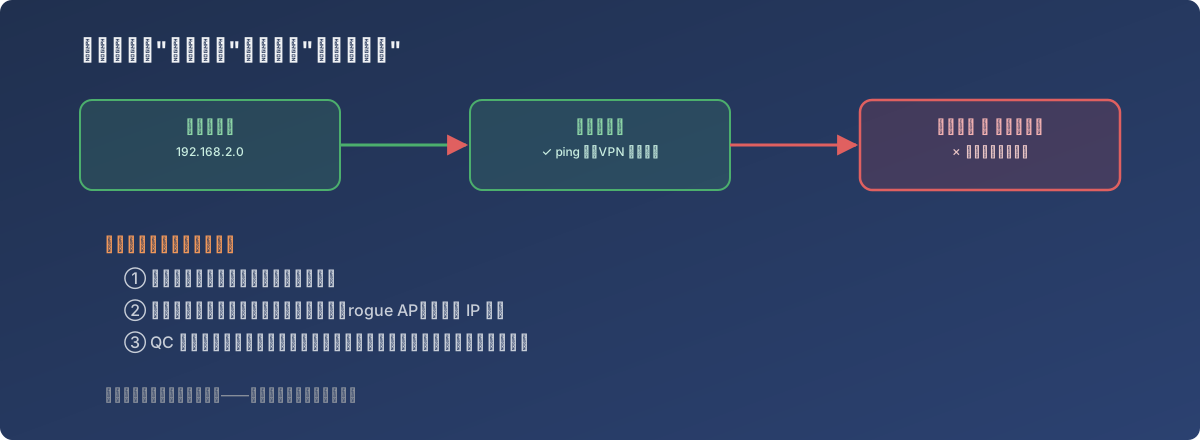
Remote tools can tell you where the connection fails - they can’t tell you why
What the on-site visit found: more physical than expected
The first thing the technician found on-site explained nearly every symptom at once: the network switches for the ground-floor QC and Production areas were never physically connected to the main network in the second-floor server room. In other words, no amount of configuration tweaking would have fixed this - the link had been broken at the physical layer the entire time. This also explains the partial-then-total ping failure pattern: the devices were likely losing connectivity gradually as whatever caused this disconnection happened.
The investigation also turned up a second, unrelated problem: two unauthorized WiFi routers (rogue APs) on the ground floor were causing IP address conflicts, adding further noise to an already broken network.
The fix: restore the physical link first, then clean up the details
- A cabling vendor was brought in to run new dedicated ethernet cable, connecting the ground floor directly back to the second-floor server room’s main network, restoring basic connectivity;
- The on-site investigation found the Production area’s network was actually running through a consumer-grade TP-Link router, splitting one ethernet drop between a PC and a label printer - a stopgap wiring arrangement that should have been removed once proper cabling was in place, but never was;
- The far end of the QC area’s existing cable run couldn’t be traced on-site. Rather than continuing to chase down where an unidentified cable actually went, the team decided to lay an entirely new data point for the printer instead.
Lessons
- Pure remote troubleshooting has a hard ceiling. In this case, “tunnel works, everything internal is dead” could be inferred from pings and user reports - but pinning down exactly which physical link was broken required someone on-site. There’s no point over-investing in remote diagnosis past that ceiling; scheduling an on-site visit early is usually the faster path;
- A physical-layer disconnection never shows up as an error in any configuration screen. Focusing only on DHCP, VLANs, or firewall policy would have pointed entirely in the wrong direction here, because the device was never correctly cabled in the first place - whether the configuration was right or wrong was irrelevant;
- Unauthorized network equipment (rogue APs) is a risk that accumulates quietly. Two WiFi routers of unknown origin turned into extra interference right when the network was already broken. Periodic on-site audits of actual cabling and connected devices cost far less than discovering them mid-outage;
- When facing old cabling of unknown origin that can’t be traced to its other end, it’s often cheaper to declare it untrustworthy and run a new cable than to keep chasing down where an unidentified line actually goes - the cost of fresh cabling is far more predictable than repeated investigation of an unverifiable one.